Documentation
Create A Small Plugin
The fastest way to understand Agent Zero plugins is to make one small enough to hold in your head: a local plugin that adds an unread dot beside a chat.
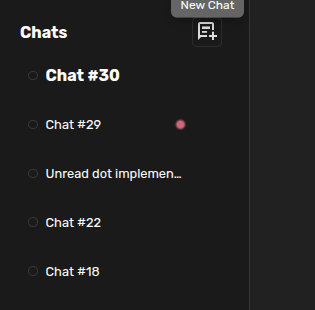
What You Are Making
unread_dot is intentionally tiny: no server endpoint, no tool, no package install, no network calls, and only one small Web UI behavior.
Ask Agent Zero To Build It
Open a new chat and give Agent Zero the plugin name, location, visible behavior, and boundaries. Ask it to use the plugin creation skill and keep the plugin local-only unless you intend to publish it.
Use the a0-create-plugin skill.

Create a local-only plugin named unread_dot in /a0/usr/plugins/unread_dot.
The plugin should show a pulsing dot in the chat list whenever a non-selected
chat receives new agent activity.

Keep it minimal and frontend-only. Do not run CodeRabbit.
Where The Files Go
Local plugins live under /a0/usr/plugins/<plugin_name>/. Keep the first version small: a manifest, a README, Web UI extension hooks, CSS, and a small store.
Try It For Real
- Refresh the page so the Web UI extension list is rebuilt.
- Open a fresh chat and send a short prompt.
- Switch to another chat while the first one is still active.
- Look for the unread dot in the chat list.
Review It
Run the plugin review skill before treating the plugin as done. Browse the public plugin catalog for published examples. For source-linked architecture and deeper internals, use DeepWiki for Agent Zero.