Architecture
Multi-Agent Cooperation
Agent Zero employs hierarchical multi-agent cooperation where superior agents delegate tasks to subordinates for efficient problem-solving and workload distribution.
Understanding Multi-Agent Architecture
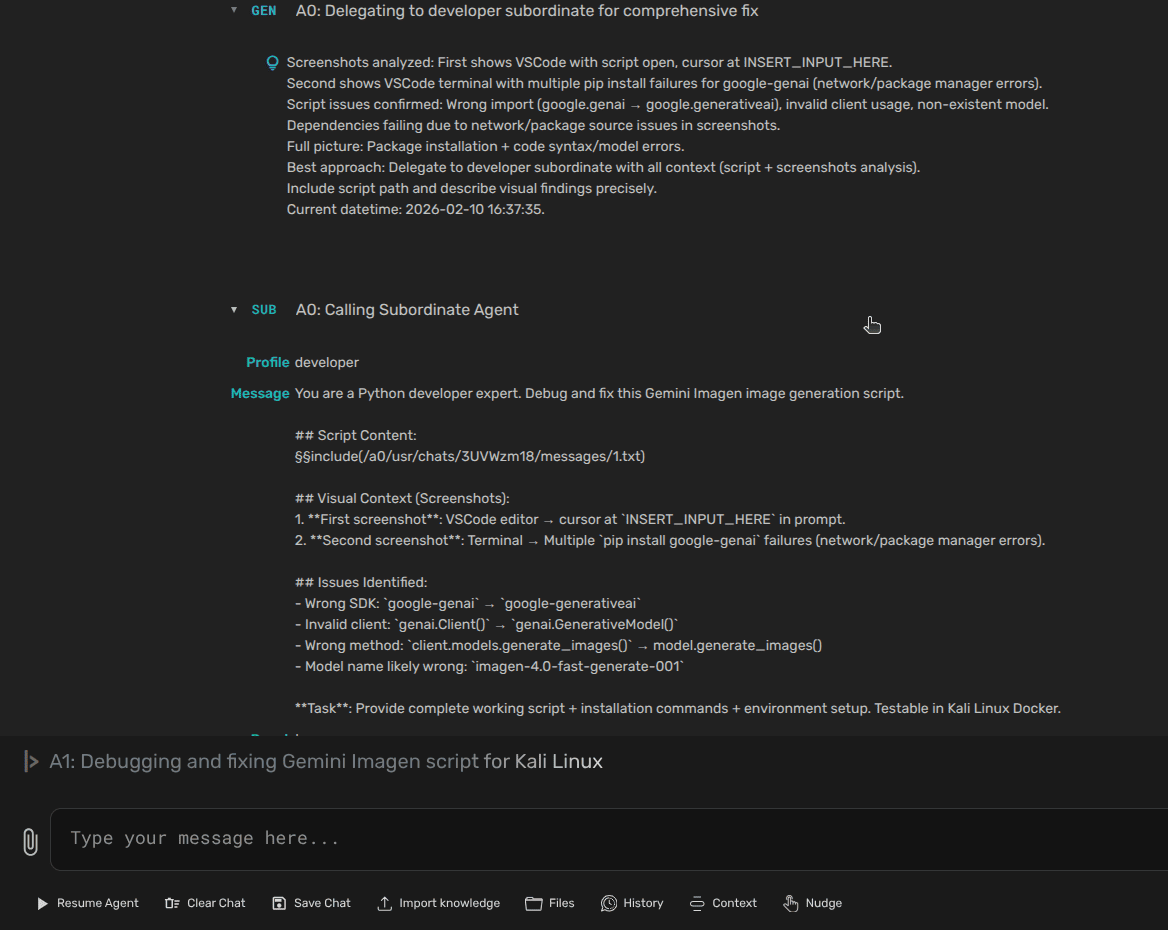
One of Agent Zero's unique features is multi-agent cooperation. The framework uses a hierarchical structure where agents can create and delegate to subordinate agents, enabling complex task decomposition and parallel execution.
Key Concepts
- Creating Sub-Agents: Agents can create subordinate agents to delegate sub-tasks, helping manage complexity and distribute workload
- Communication: Agents can communicate with each other, sharing information and coordinating actions through the message system
- Hierarchy: Agent Zero uses a hierarchical structure with superior agents delegating tasks to subordinates for structured problem-solving
Agent Hierarchy and Communication
The user or Agent 0 is at the top of the hierarchy, delegating tasks to subordinate agents, which can further delegate to other agents. Each agent can utilize tools and access shared assets (prompts, memory, knowledge, extensions, and skills) to perform its tasks.
Communication Flow
Communication flows between agents through messages structured according to prompt templates. Messages typically include:
- Thoughts: The agent's Chain of Thought and planning process
- Tool name: The specific tool used by the agent
- Responses or queries: Results, feedback, or queries from tools or other agents
Typical Interaction Flow
- The user provides an instruction to Agent 0
- Agent 0 initializes VectorDB and accesses memory
- Agent 0 analyzes the instruction and formulates a plan using
thoughts, possibly involving tools or sub-agents - If necessary, Agent 0 delegates sub-tasks to subordinate agents
- Subordinate agents use tools to perform actions, providing arguments and responses
- Agents communicate results and feedback back up the hierarchy
- Agent 0 provides the final response to the user
💡 Key Benefit: This hierarchical approach allows efficient breakdown of complex tasks into smaller, manageable sub-tasks with parallel execution where possible.
The call_subordinate Tool
Agents use the call_subordinate tool to delegate tasks to subordinate agents. This is Agent Zero's primary mechanism for task decomposition.
How It Works
- Agent 0 identifies a sub-task that can be delegated
- Uses
call_subordinatetool with specific instructions - A new subordinate agent is spawned with its own context
- Subordinate agent executes the task using available tools
- Results are communicated back to the parent agent
- Parent agent integrates results into its overall solution
Example Delegation:
Agent 0: "I need to analyze a large dataset and generate visualizations"
↓ delegates to →
Subordinate 1: "Analyze the dataset and extract key metrics"
Subordinate 2: "Generate charts and visualizations from the metrics"
↓ results flow back to →
Agent 0: Combines results into final report
Agent Profiles & Configuration
Agent profiles allow you to customize the behavior of Agent 0 and its subordinates by overriding prompts, tools, extensions, and sub-agent settings. Each profile can define unique characteristics and capabilities.
What Are Agent Profiles?
Agent profiles are custom configurations located in /agents/<agent_profile>/ that modify how agents behave. They can override:
- Prompts: Customize system prompts and communication style
- Tools: Add custom tools or override existing ones
- Extensions: Modify agent lifecycle hooks and behavior
- Sub-agent settings: Control which sub-agents are available (via
agents.json)
Profile Structure
/agents/
└── my_custom_agent/
    ├── prompts/                    # Override system prompts
    │   ├── agent.system.main.role.md
    │   ├── agent.system.main.communication.md
    │   └── agent.system.tool.*.md
    ├── tools/                      # Custom or overridden tools
    │   └── custom_tool.py
    ├── extensions/                 # Custom extensions
    │   └── agent_init/
    │       └── custom_extension.py
    └── agents.json                 # Sub-agent configuration
agents.json Configuration
The agents.json file controls which sub-agents are enabled or disabled for a specific agent profile. This allows you to customize the available tools and capabilities for subordinate agents.
Example agents.json:
{
  "browser_agent": {
    "enabled": true
  },
  "code_agent": {
    "enabled": true
  },
  "research_agent": {
    "enabled": false
  }
}
When a subordinate agent is created, it inherits the sub-agent configuration from the parent agent's profile, ensuring consistent behavior across the agent hierarchy.
Creating a Custom Agent Profile
- Create a new directory under
/agents/with your profile name - Add only the components you want to customize (prompts, tools, extensions)
- Create
agents.jsonto configure available sub-agents - Select your profile in Settings → Agent Configuration → Agent Profile
💡 Tip: Start by cloning the _example agent profile and modifying it to your needs. Agent Zero automatically merges your custom profile with the default configuration.
Built-in Profiles
Agent Zero includes several pre-configured profiles:
- agent0: Default profile with balanced capabilities
- hacker: Security-focused profile with specialized prompts and tools
- researcher: Optimized for research and information gathering
- _example: Template profile for creating custom configurations
Project-Specific Agent Configuration
When using Projects, each project can have its own agents.json file located in .a0proj/agents.json. This allows project-specific sub-agent configurations:
- Enable/disable specific sub-agents per project
- Different capabilities for different project types
- Isolated sub-agent behavior within project context
Project-level agents.json takes precedence over the agent profile's configuration when a project is active.
Common Multi-Agent Use Cases
Complex Task Decomposition
Break large tasks into specialized sub-tasks:
- Research agent gathers information
- Analysis agent processes data
- Writing agent generates reports
- Review agent validates output
Parallel Processing
Execute independent tasks simultaneously:
- Multiple data sources processed in parallel
- Independent API calls delegated to separate agents
- Concurrent file processing operations
- Results aggregated by parent agent
Specialized Agent Roles
Delegate to agents with specific expertise:
- Coding agent for implementation tasks
- Testing agent for quality assurance
- Documentation agent for writing guides
- DevOps agent for deployment operations
Best Practices
When to Use Sub-Agents
- Complex tasks: When a task can be broken into clear sub-components
- Parallel work: When independent operations can run simultaneously
- Context separation: When sub-tasks benefit from isolated context
- Specialization: When different expertise is needed for different parts
Avoid Over-Delegation
- Don't delegate trivial tasks - adds overhead
- Keep delegation depth reasonable (2-3 levels max)
- Ensure sub-tasks are sufficiently independent
- Consider token costs of multiple agent contexts
Communication Guidelines
- Provide clear, specific instructions to subordinates
- Define expected output format
- Include necessary context but avoid redundancy
- Use structured message formats for consistency
Need Help?
Questions about multi-agent cooperation? Reach out to the community!