
Bots
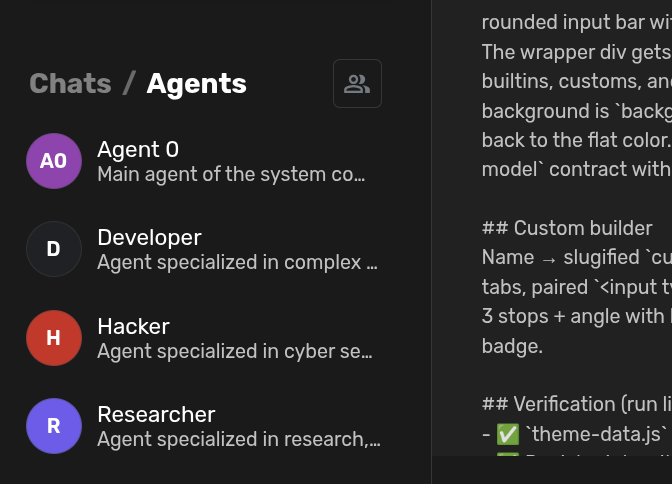
Adds a WhatsApp-style Agents list to the sidebar with persistent profile chats, pinning, hiding, and quick agent management.
Screenshots
README
Bots

WhatsApp-style Agents list in the Agent Zero sidebar with an inline
Chats / Agents switcher in the section header.
Install
Install Bots from Agent Zero's Plugin Hub, or clone this repository as
usr/plugins/a0_bots, enable it in Settings → Plugins, and reload the WebUI.
What it does
- The
Chats / Agentsswitcher replaces only the title inside the shared Chats header, preserving its New Chat button and controls contributed by other plugins. The unselected word is dimmed and clickable. Selected tab persists per browser (localStoragekeya0_bots_tab). - Agents tab: lists enabled agent profiles with a round avatar (exact same colors/avatars as the core agents popover via
modelConfigStore.getAgentProfileVisual), title, and description snippet. A header button (people icon) opens the core Agent Editor "Manage agents" modal. - Clicking an agent opens one persistent chat per profile, named
[Agent] <Profile Title>. The first click creates it; later clicks return to the same chat. Rows use the corechat-container/chat-selectedclasses, so hover/selected states match core chats 1:1. - Three-dots row menu: Pin to top / Unpin and Hide, persisted server-side in the plugin config.
- Chats tab: the core or plugin-provided chat list, with the original New Chat button and sidebar view controls. The Agents tab hides chat lists and chat-specific controls without replacing them.
Persistence & migration
- Profile binding is stored as context data key
a0_bots_profile(serialized by chat persistence, survives reloads/restarts). - Legacy bindings from the plugin's previous name (
profile_chats_profile) are still recognized and are migrated to the new key (and renamed to the[Agent] ...scheme) the next time the profile is opened. - Pin/hide state lives in
usr/plugins/a0_bots/config.json, also editable in Settings → Bots (plugin config page).
Structure
plugin.yaml— manifest (namea0_bots, title "Bots").api/profiles.py—POST /api/plugins/a0_bots/profilesapi/open_chat.py—POST /api/plugins/a0_bots/open_chat(get-or-create + migrations)api/prefs.py—POST /api/plugins/a0_bots/prefs(pin/hide get/set)api/avatar.py—GET /api/plugins/a0_bots/avatar?profile=<key>helpers/common.py— data keys, naming scheme, avatar lookup.webui/bots-store.js— Alpine store$store.a0Bots.webui/config.html— settings page.extensions/webui/sidebar-chats-list-start/bots.html— sidebar UI.
Notes
- Deleting an agent's chat unbinds it; the next click creates a fresh persistent chat.
- Reload the WebUI page (hard reload) after installing or renaming the plugin.
UI regression check
With Bots enabled, at least one chat, and one visible agent profile, run tests/sidebar-compat.js
through Playwright CLI's run-code --filename against the local WebUI. When
Sidebar Folders is enabled, it checks both folder and flat views, header controls,
chat and agent menus, pin isolation, and cleanup. It restores the browser tab and
does not save changes to chats, profiles, or plugin configuration.
License
MIT