a2ui-zero
Rich, interactive AI responses directly in Agent Zero chat. Compose cards, images, audio, video, comparisons, and forms at runtime; choices and submitted answers continue the conversation. Uses A2UI v0.9.1 with a native component catalog and Agent Zero design tokens.
Screenshots
README
a2ui-zero
Rich answers that belong in Agent Zero: interactive cards, images, audio, video, comparisons, forms, and choices directly in chat.
Try it
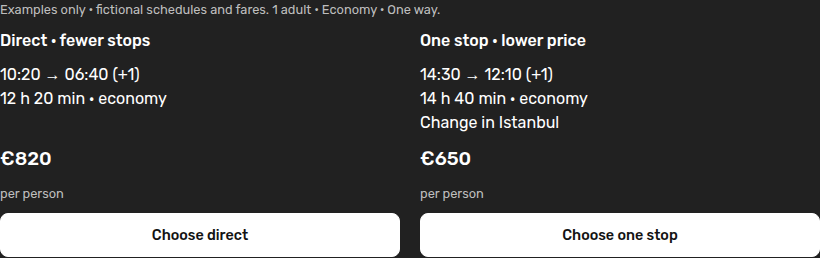
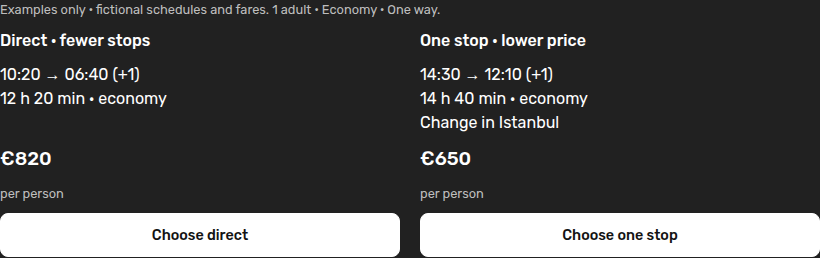
- “Show two illustrative flight options from Rome to Tokyo as interactive cards. Let me choose direct or one stop. Don't book anything.”
- “Give me a visual Kyoto guide with a photograph and choices for what to explore.”
- “Ask me for a destination, interests, date and daily budget in an interactive form, then use my answers to plan a day.”
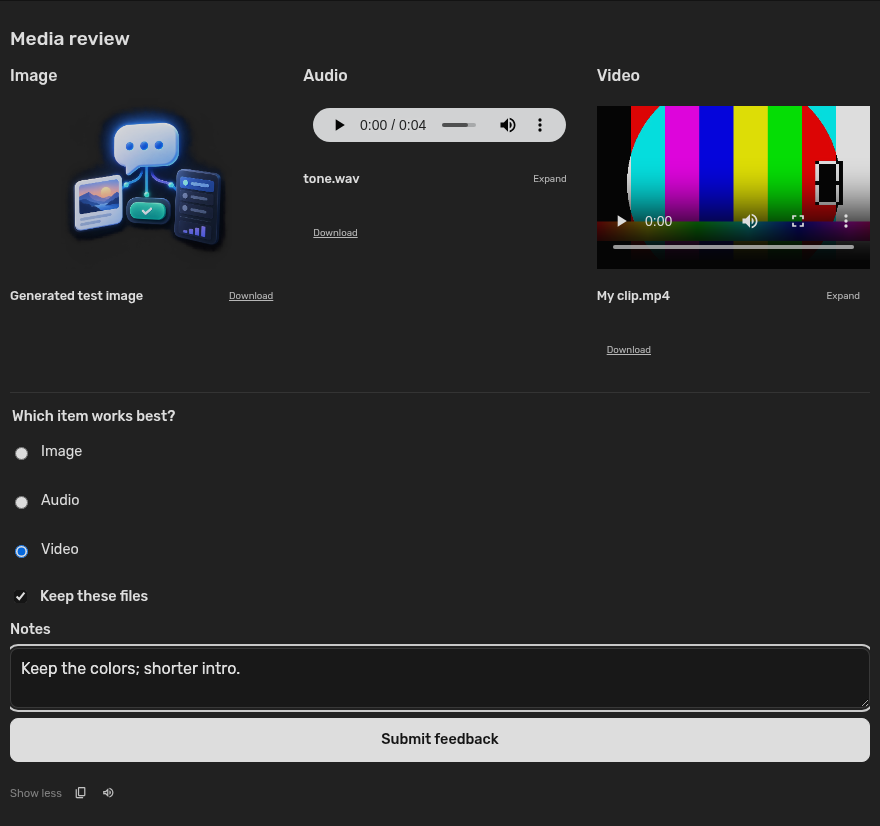
- “Show the generated image, audio, and video together so I can review them.”
The agent uses its existing configured model and research tools. A2UI adds the presentation and interaction; it does not supply flight inventory, photos, or booking services. Choices send ordinary user messages. Form submissions include readable labels and entered values. They do not directly execute agent tools.
Install
Requires an Agent Zero build with community plugins, the set_messages_after_loop
WebUI hook, and its existing jsonschema dependency.
Install this repository through
Plugins → Add plugin using its URL, or upload a plugin ZIP. Refresh the WebUI
and start a new chat so the agent receives the tool instructions. There are no
new packages, service keys, servers, CDN scripts, or manual Execute steps.
The display/repository name is a2ui-zero. Agent Zero's required runtime name
is a2ui_zero, installed in /a0/usr/plugins/a2ui_zero.
What is supported
The plugin consumes real A2UI v0.9.1 envelopes with the custom catalog
urn:a2ui-zero:catalog:1. The catalog is supplied locally, never fetched from an
agent-provided URL. Its schema is in schema/catalog.json.
| Purpose | Components |
|---|---|
| Layout | Column, Row, List, Card, Divider |
| Content | Text, Image, Icon, Link |
| Media | Audio, Video |
| Choices | Button, ChoicePicker |
| Forms | TextField, CheckBox, DateTimeInput, Slider |
Colors, typography, spacing, borders, focus rings and controls inherit Agent Zero's design tokens, including light mode. Rich views and media previews sit inside the response body, above its normal actions, and follow its Show more / Show less controls. Surfaces and cards have no decorative frame or background. Surface titles are accessibility labels; use a Text component when the answer needs a visible heading.
Comparison cards stretch evenly within a Row and stack when the available width gets narrow. Use a Column inside each Card, ending with a Button or a Column/Row of summary details and actions; that footer anchors to the bottom automatically. This keeps prices and choices aligned without fixed heights or clipped text.
The examples are authoring references, not fixed workflows. The agent composes and updates these components at runtime. A questionnaire can combine several radio or checkbox groups with separate text fields for custom answers, then submit them together. Conditional fields require an agent update; choosing "Other" does not automatically reveal a text field.
Media previews
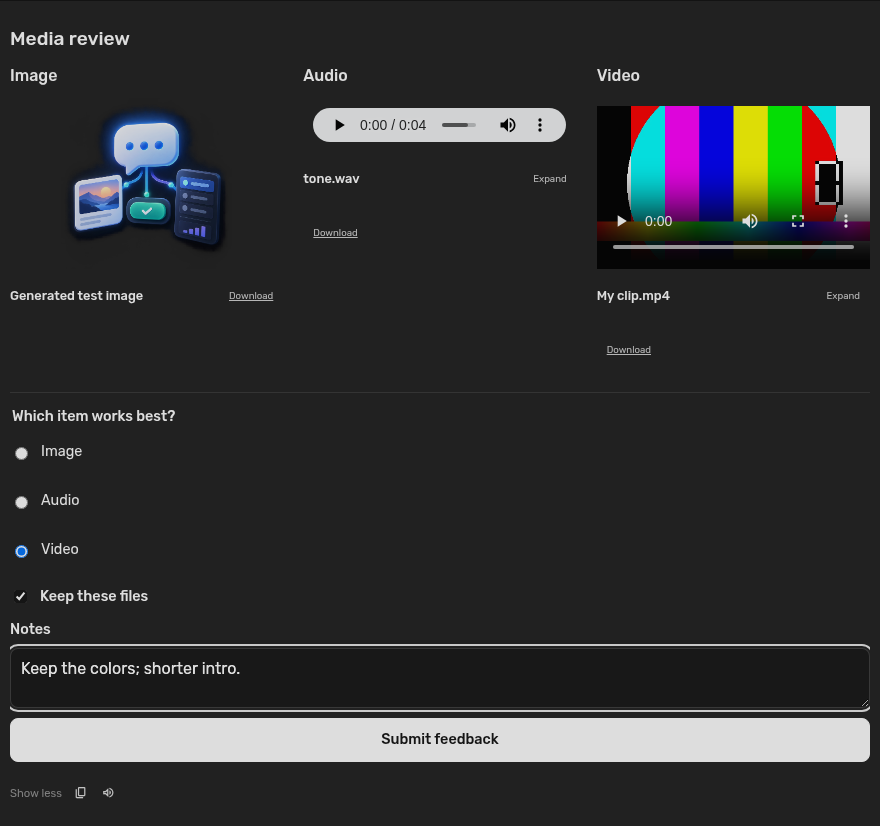
Images, audio, and video play directly in rich chat cards, including files created by generation tools. Image cards open Agent Zero's existing zoom/pan viewer. Audio and video use native playback controls and can expand in the native modal shell.
Ordinary assistant replies containing media file links receive inline preview cards automatically, without another model call. Existing Markdown images keep their native preview and image viewer. Text, scripts, and code retain their existing file and Editor behavior.
Image:url,alt; optionalcaptionandfit(containorcover).Audio:url,title; optionalcaption.Video:url,title; optionalcaptionandposter(an image source).
Sources may be HTTP(S) URLs or existing files inside /a0, such as
/a0/usr/workdir/output.mp4, file:///a0/usr/uploads/recording.wav, or
img:///a0/usr/workdir/generated.png. Standard Agent Zero image/download links
are also recognized. URL and poster fields support data-model bindings.
Use actual output paths from tools; the plugin does not generate media itself.
Local files stream through an authenticated, media-only endpoint with byte-range
support for seeking. Files outside /a0, including escaping symlinks, are rejected.
Playback starts only on user interaction; opening an expanded player pauses its
inline counterpart, and closing it releases playback.
Recognized formats: JPEG, PNG/APNG, GIF, BMP, WebP, AVIF, SVG/SVGZ, ICO;
MP4, WebM, OGV, MOV; MP3, WAV, FLAC, AAC, M4A, OGG, and Opus. OGG defaults to
audio; use an explicit Video component for an Ogg video. Playback depends on
the browser's codecs; unsupported files keep an original-file link. No transcoder,
external player, autoplay, HTML, PDF, or code preview is added.
Agent tool
a2ui accepts action: "show", a plain-text fallback text, and messages.
Optional argument: title. show completes the turn. action: "inspect" reads this
chat's current surface state without ending the turn.
Supported messages: createSurface, updateComponents, updateDataModel, and
deleteSurface. Use one root component per surface. Create a surface once;
later messages can replace components by ID or replace/delete data at a JSON
Pointer. Forward component references render when their definitions arrive.
Complete tool arguments: flight comparison, place guide, trip brief.
Button.action.event uses name: "user_message" and
context: {"message": "The user's readable request"}. Its message is shown in
the button tooltip. Local form edits update bound text immediately. Submitting
validates against the saved component definitions and current revision, then
uses Agent Zero's normal send/queue behavior. The composer draft and attachments
are preserved; a choice never moves to a different chat.
Persistence and boundaries
- Current surfaces live in Agent Zero's persisted chat context; response logs retain snapshots for history replay and exported chats. Older chat responses remain historical snapshots; stale choices are rejected. Deletion removes the current surface, preserving the transcript.
- Local form edits stay in the current chat while mounted. They are discarded on a new server revision, chat switch or page reload. Submit them before leaving if the agent should remember them.
- Form values enter ordinary chat messages. There is no password/secret input component or private credential handoff to terminal tools; do not use these forms to collect credentials.
- Supports this custom catalog, not the entire upstream Basic Catalog. Static
child references and JSON Pointer bindings are supported; template child lists,
arbitrary client functions, custom themes, HTML, scripts and iframes are not.
sendDataModelmetadata is not used: this transport sends the visible form fields as a normal user message. Input bindings must use distinct leaf paths. - Updates stream through Agent Zero's existing log synchronization after each completed tool call. Partial JSON tokens are not rendered.
- Up to 16 surfaces / 500 KB state per chat, 160 component definitions per surface, 512 expanded nodes, 24 nesting levels, and 4,000 characters per value.
- Media accepts the sources described above; ordinary Link components accept HTTP(S) URLs plus plugin-owned assets. External media is fetched by the browser; images use no referrer. Text remains selectable plain text; the normal response fallback can still use Agent Zero Markdown.
- Disable/remove through Plugins. Hooks create no external files or processes and never alter shared dependencies. Saved chat snapshots remain; the readable fallback continues to work without this plugin.
Since 0.3.0, all A2UI views appear in chat. There is no canvas panel or launch
control. Older saved views also render in chat; their obsolete canvas controls
are ignored. The removed CanvasPanel, placement, and open_in_canvas options
are rejected in new tool calls.
Development
Use the existing Agent Zero environment:
conda run --no-capture-output -n a0 python -m unittest discover -s tests -v
node tests/renderer.test.mjs
With the installed WebUI open on a test chat, run the DOM regression through
Playwright CLI: playwright-cli run-code --filename tests/chat-rendering.browser.js.
It checks response containment, action ordering, repeat rendering, fallback
visibility, and unframed styling without submitting a message.
For the streaming API check, run inside the installed Agent Zero framework:
cd /a0/usr/plugins/a2ui_zero
PYTHONPATH=/a0 /opt/venv-a0/bin/python tests/check_media_api.py
See the implementation plan, verification report, and artwork provenance. Plugin code is MIT licensed; the two upstream A2UI schemas retain their Apache 2.0 license and attribution in schema/NOTICE.md.
Media preview coverage and inline file-serving approach are adapted from
keyboardstaff/attachment_preview
by Wabifocus (keyboardstaff), MIT licensed. Attribution is retained in the
root LICENSE; the reference revision is
aae4c890a5fba3d84d0b49ff6f90493ed7b212f6.