
Fish Audio
Browse public and personal Fish Audio voices, generate MP3 speech, and read Agent Zero replies aloud with S2.1 Pro Free.
Screenshots
README
Fish Audio for Agent Zero
<img src="webui/logo.png" width="120" height="120" alt="Fish Audio waveform fish logo">Browse voices, generate downloadable MP3 speech, and read Agent Zero replies aloud using Fish Audio S2.1 Pro Free.
This is a community plugin, not an official Fish Audio product. It always sends model: s2.1-pro-free. There is no paid-model fallback or model selector.
Install
Download Fish Audio 1.0.0 and install the ZIP through Agent Zero's Plugins → Install flow, or place the plugin contents in /a0/usr/plugins/fish_audio/. plugin.yaml belongs directly in that directory. Reload the WebUI after installation. Checksums and release notes are on the release page.
Requires an Agent Zero version with the plugin system and /js/tts-service.js provider interface, Python 3.12+, and the framework's existing httpx dependency. No SDK, local speech model, FFmpeg, or extra dependency installation is required.
Connect and choose a voice
- Create an API key at Fish Audio.
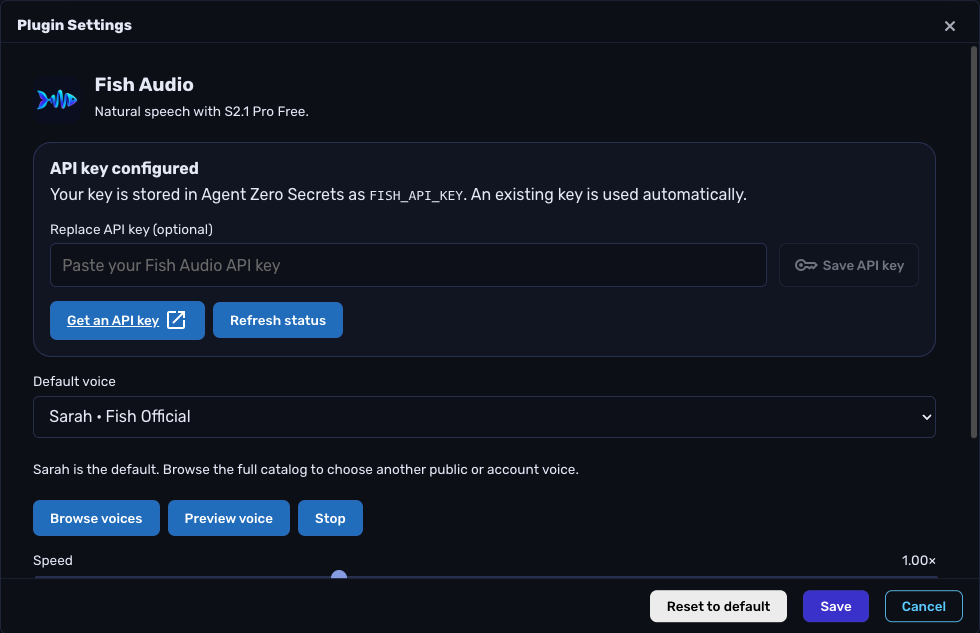
- Open Settings → Agent Settings → Voice → Fish Audio → Configure, paste your key, and click Save API key. This writes only
FISH_API_KEYin Agent Zero's global Secrets store, preserving other entries. A key already saved in Secrets works automatically. You can instead supplyFISH_API_KEYto the framework process environment; that value takes precedence and is managed outside the plugin. - Sarah is selected by default. The dropdown also includes Fish Official voices Adrian, Ethan, Selene, Hannah, Jordan, and Laura. Click Preview voice to hear a short sample.
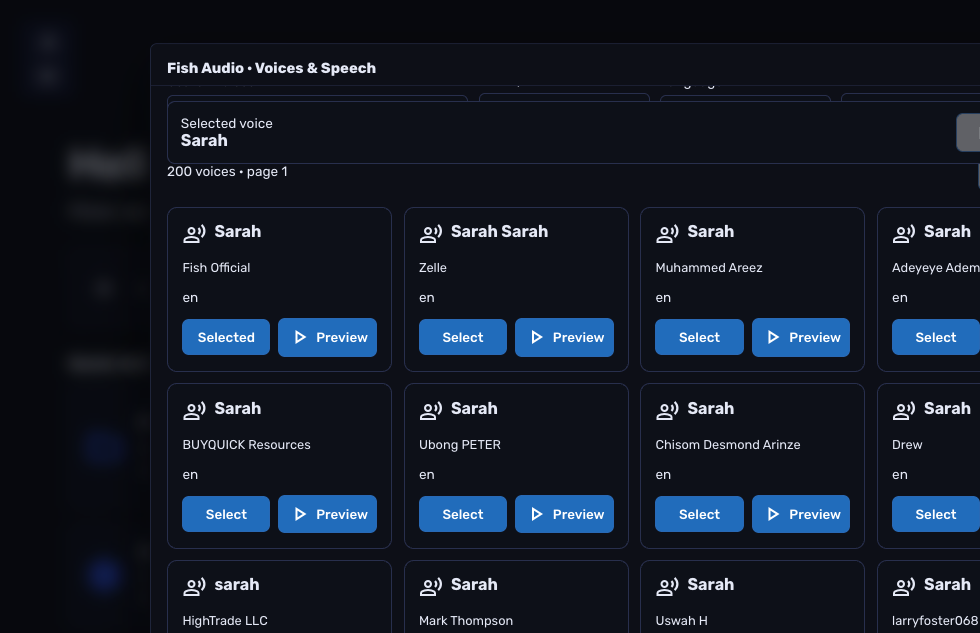
- Click Browse voices for the full public library, My voices, or a direct voice-ID lookup. Select a voice, close the browser panel, and Save the settings. A custom voice remains selected in the dropdown.
The password field is write-only and clears on submission or close. Credentials are never saved in plugin configuration, browser storage, API responses, or generated tool messages. To delete a key, use the global Secrets editor. Account-owned voice metadata stays in the current browser view; no catalog is saved to disk.
Generate and download speech
Open Voices & speech, select a voice, enter up to 5,000 characters, choose a speed between 0.5× and 2×, and click Generate speech. Use Play, Stop, and Download MP3. Output is MP3 at 128 kbps.
The chosen voice survives searches and pagination. Save as default voice explicitly saves the generator selection. Browsing from settings changes the settings draft only; the settings Save button applies it.
Panel audio is held in browser memory and released when the panel closes. Stop cancels the browser request and discards late results; synthesis already running at Fish may continue until the server completes it. There is no persistent generation history.
Chat read-aloud
Enable Use Fish Audio for chat read-aloud in plugin settings and Save. Use Agent Zero's normal read-aloud controls or automatic speech preference.
Fish takes exclusive control of the shared TTS service while selected and configured. Other registered TTS providers, including Kokoro and providers loaded later, are paused in the page and restored when Fish chat speech is switched off or Fish is disabled. Their saved configuration and plugin activation remain intact. The Fish card displays the actual active provider. Whisper stays available through the separate microphone transcription service. Already-open tabs refresh this preference on focus or within 30 seconds.
Ordinary Fish synthesis failures use Agent Zero's browser-native speech fallback and show a notification. A stopped or superseded request is discarded. Chat read-aloud starts off by default; installing the plugin does not send chat text to Fish.
Agent tool
Ask Agent Zero to find a Fish voice or create spoken audio. The fish_audio tool supports:
| Action | Inputs | Result |
|---|---|---|
voices |
Optional title, language, self, sort_by, page_number, page_size |
Voice IDs and safe metadata |
voice |
voice_id |
One voice's metadata |
synthesize |
text, optional voice_id and speed |
MP3 artifact path |
Speech files created by the tool use unique names under /a0/usr/workdir/fish_audio/. They are user outputs and remain after plugin removal. Download them through Agent Zero's file browser; remove them there when no longer needed. The tool does not accept an arbitrary output path.
Configuration and interfaces
Global settings only: voice_id and voice_title (default Sarah), speed (default 1.0), and chat_enabled (default false). Unknown settings are rejected, including credential and model override fields. Runtime settings belong to Agent Zero user state, not the plugin repository.
Browser APIs are authenticated, CSRF-protected POST /api/plugins/fish_audio/{status,credentials,voices,voice,synthesize}. Status returns readiness, credential source, starter voices, and non-secret configuration. The credentials endpoint accepts a write-only api_key and returns readiness only. Voice endpoints use Fish's GET /model and GET /model/{id}. Synthesis returns {success, audio, mime_type} for the existing TTS service. All external traffic goes to https://api.fish.audio; redirects are not followed.
Voice lookup/search allows 30 seconds total. Synthesis allows 180 seconds total with a 60-second inactivity timeout. Responses are limited to 2 MiB for catalog JSON and 16 MiB for audio; requests are limited to 64 KiB. Failed requests are not automatically retried. Preview uses a short fixed sentence.
Troubleshooting
- API key needed / key rejected: save a key in Fish Audio settings or global Secrets, then Refresh status. Check whether an environment key overrides the UI key. “Configured” means a key exists; a voice search or preview verifies access.
- Voice unavailable: choose another voice or use an account that has access. Public libraries can change.
- Busy / timeout: try again later or use shorter text. Fish's free model has no guaranteed latency or DPA; no paid fallback is attempted.
- No audio: interact with the page, then Play. Check the browser's autoplay restrictions and the active provider shown in Voice settings.
- Kokoro still speaks: Save the Fish chat read-aloud switch, then refresh the page. Check the actual provider label; a missing key prevents Fish registration.
- After installation/update: reload Agent Zero so plugin assets and extension registrations refresh. Manual file-copy updates may also require restarting Agent Zero's web service to clear cached Python modules.
Speech text and the selected voice ID are sent to Fish Audio when generating or previewing speech. Existing voices only: voice cloning, voice design, ASR, multi-speaker dialogue, and live WebSocket streaming are outside this release.
Development and verification
From the Agent Zero root, run backend tests in the framework environment:
PYTHONPATH=/a0 /opt/venv-a0/bin/python -m unittest discover \
  -s usr/plugins/fish_audio/tests -p 'test_*.py' -v
A0_ROOT=/a0 node --test usr/plugins/fish_audio/tests/frontend.test.mjs
Tests use fake keys and mocked Fish responses. Frontend tests load the actual host TTS service and exercise provider selection, fallback, stale responses, and cancellation. No network access or real credentials are required. See the verification report for release-specific evidence and limitations.
For community distribution, keep this directory's contents at the standalone repository root. plugin.yaml is the runtime manifest; the separate a0-plugins submission uses index.yaml. Do not package .env, config.json, .toggle-*, generated audio, or caches.
The logo is included at the root and in webui/. thumbnail.jpg is a square 256 × 256 image under 20 KB; webui/thumbnail.jpg is the native plugin-list image. The matching index thumbnail lives alongside its index.yaml. See logo assets and generation prompt.
References
Licensed under MIT; see LICENSE.