
Neuro Core
Explainable, structured long-term memory for Agent Zero - typed categories, a relationship graph, transparent scoring, lifecycle maintenance, and an interactive Context Graph that shows why every memory ranked where it did.
Screenshots
README
Neuro Core
Explainable, scoped memory for your agents.
See, understand, and curate everything your agents remember — from an interactive graph where every memory, every relationship, and every ranking factor is right there on the screen.




Quick Start | Features | How It Works | Documentation
</div>Agents forget — and when they do remember, you usually can't ask why a particular memory surfaced or what it's actually connected to. Neuro Core fixes both halves of that problem: it gives your agents structured, continuously maintained long-term memory, and gives you a window onto all of it.
Neuro Core is an extensible, explainable memory system for Agent Zero. Rather than treating memories as isolated text entries, it introduces a structured memory architecture that enables agents to organize, evaluate, connect, and retrieve information with transparency and contextual awareness.
Key capabilities include:
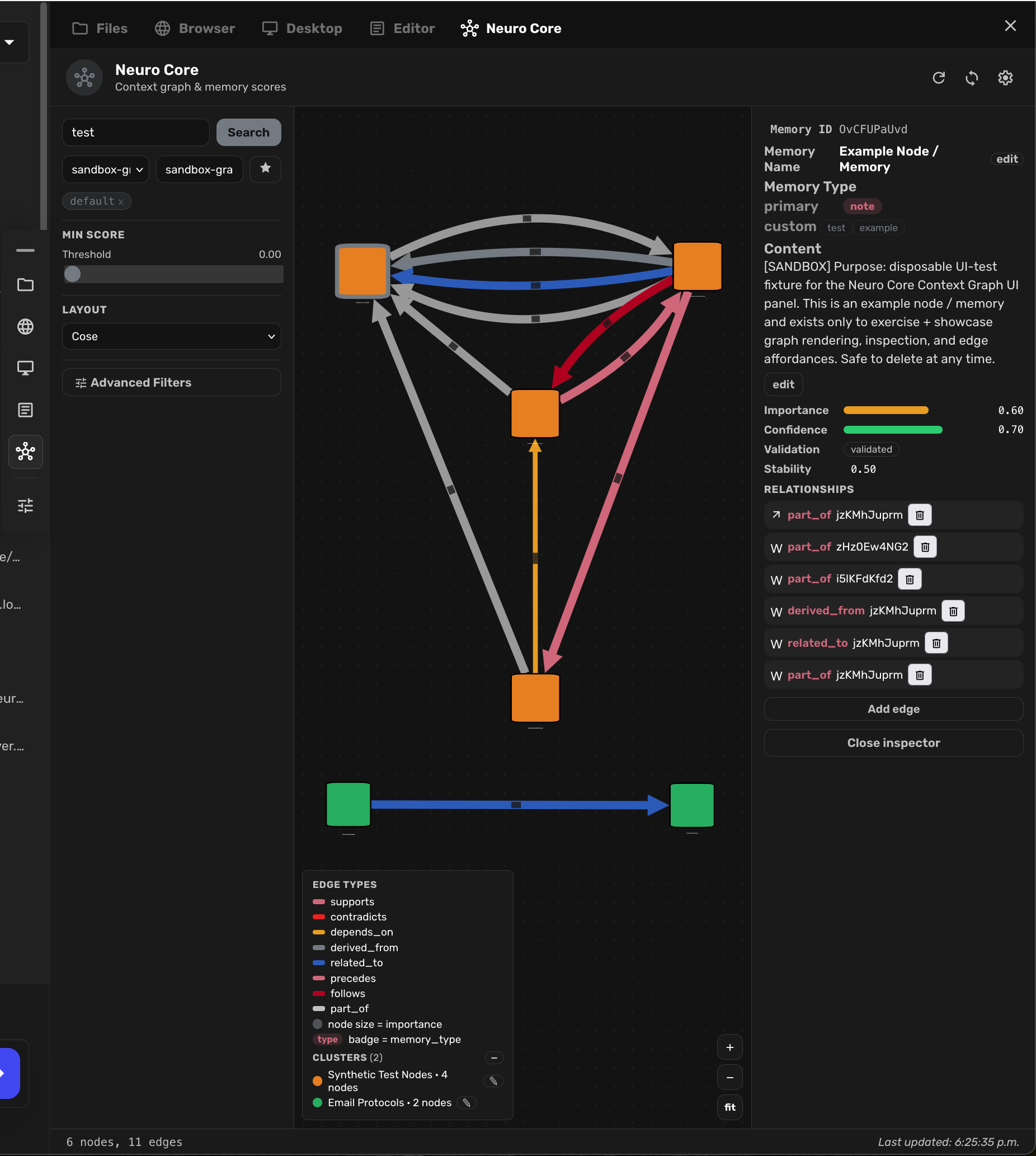
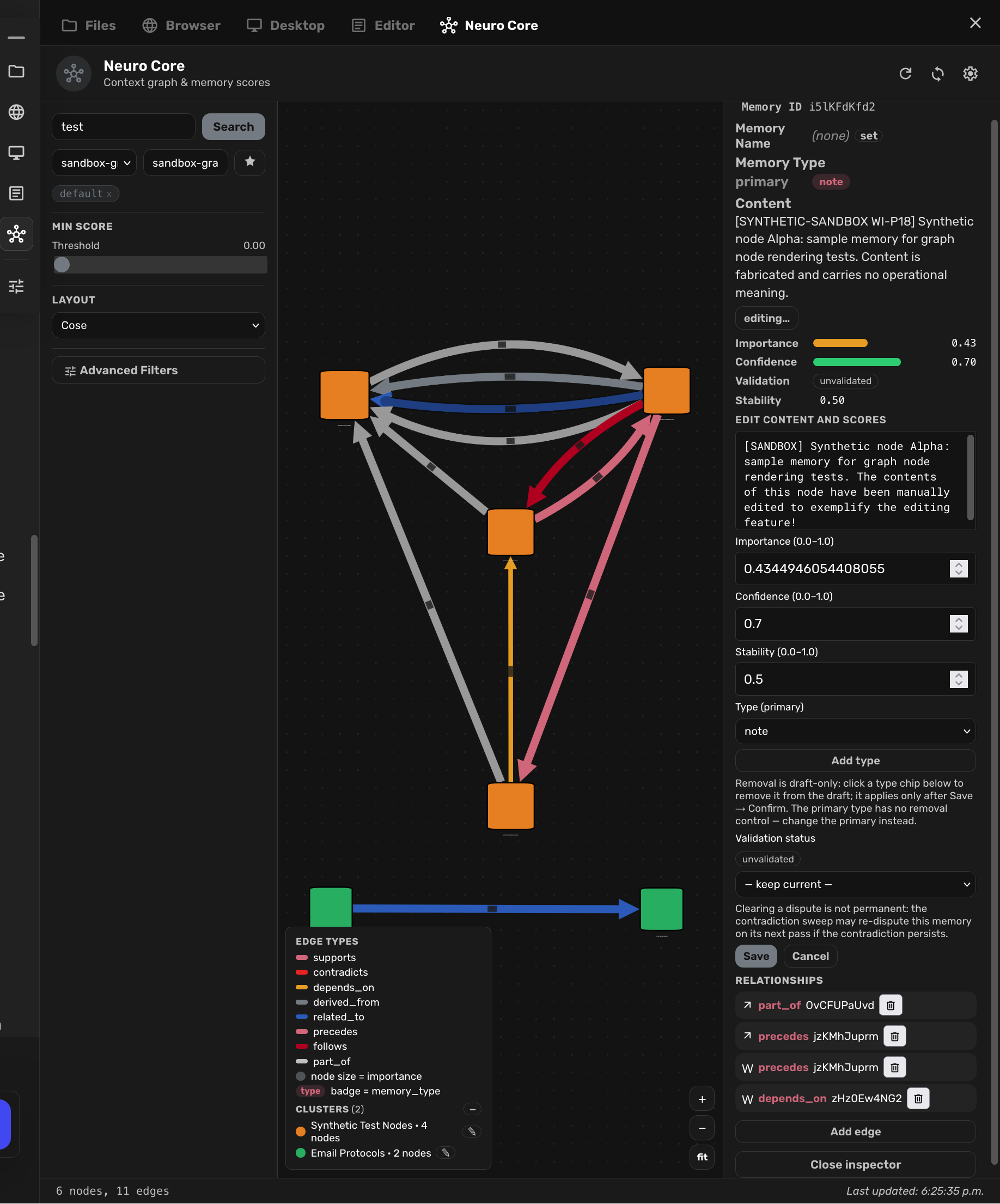
- Visual Context Graph — your memory workbench: An interactive interface for exploring, inspecting, and curating your agents' memories and their typed relationships. Give memories custom Memory Names, rename and organize graph Clusters, edit a memory's full contents in place, change its primary and custom memory types, and filter the graph by type, score, or validation status — then act on what you see, all without leaving the panel. The inspector shows the exact factors that influenced retrieval, so you can see why a memory surfaced, then edit, validate, or connect it on the spot.
- Explainable Retrieval: Hybrid memory retrieval with transparent ranking factors — semantic similarity, importance, confidence, and recency — delivered as inspectable data, not a black-box score.
- Structured Memory: Typed memory categories, metadata enrichment,
and importance, confidence, and stability scoring. When you don't
specify a type at capture time, Neuro Core assigns one for you — a
conservative, deterministic, rules-based keyword heuristic, never
semantic understanding — and records the
autoorigin so you can see (and edit) exactly what was assigned. - Relationship Graphs: A typed knowledge graph connecting memories through relationships such as supports, contradicts, depends_on, derived_from, and related_to.
- Memory Lifecycle Management: Automated importance decay, episode grouping, and implemented contradiction detection, alongside explicit validation states for managing evolving or conflicting information.
- Scoped Memory: Project- and agent-level memory isolation, keeping knowledge coherent and contextually relevant across tasks and environments.
- Agent-Native Integration: Six dedicated tools enabling agents to capture, retrieve, validate, score, relate, and reflect on memories.
- Memory Operator profile (opt-in): A ready-made agent profile giving your agents coherent operating discipline for memory work.
Built as a modular Python plugin that extends Agent Zero's existing memory infrastructure, Neuro Core combines SQLite-backed metadata, graph-based relationships, and embedding-powered retrieval — without requiring a separate database service.
The broader objective: agent memory that is not just persistent, but structured, inspectable, explainable, and maintainable — a foundation for more consistent, context-aware, and reliable AI agent behavior.
<div align="center"><img alt="Neuro Core Context Graph panel: a populated memory graph with typed relationships and an inspector showing explainable ranking factors" src="docs/screenshots/screenshot_1_darkmode.png" width="100%" />The Context Graph panel — every node is a memory; every edge is a typed relationship; the inspector explains the ranking factors.
</div>Why Neuro Core
| Feature | Why it matters |
|---|---|
| Visual memory workbench | Explore your memories as a graph, then act: rename memories and clusters, edit contents and types in place, filter by type, score, or validation status — all without leaving the panel. |
| Explainable retrieval | Every retrieved memory carries its ranking factors — similarity, importance, confidence, recency — as data you can inspect, not a black-box score. |
| Typed relationship graph | Memories connect through typed edges (supports, contradicts, depends_on, derived_from, related_to, precedes, follows), visualized in the WebUI Context Graph panel. |
| Curated scoring | Importance, confidence, and stability are first-class, editable memory properties — stored in a dedicated sidecar, not buried in text. |
| Validation lifecycle | Mark memories validated, disputed, or superseded. Validation is an annotation that shapes ranking — it never silently hides your data. |
| Automatic maintenance | Periodic jobs handle importance decay, episode grouping, and contradiction detection, so the graph stays healthy without manual sweeps. |
| Scoped isolation | Memories are isolated per project and per agent via memory_subdir, backed by a dedicated isolation test suite. |
| Memory Operator profile | An opt-in agent profile that gives your agents coherent operating discipline for memory work. |
| Zero external services | Python-only, in-process. No database daemon, no extra network egress beyond your existing embedding provider. |
See It In Action
Explore — the Context Graph panel: every node is a memory, every edge a typed relationship. See the shape of what your agent knows:
<div align="center"><img alt="Neuro Core Context Graph panel: a populated memory graph with typed relationships and an inspector showing explainable ranking factors" src="docs/screenshots/screenshot_1_darkmode.png" width="100%" /></div>Inspect & edit — click any node to open the inspector: edit scores, validation status, and typed relationships directly from the graph panel:
<div align="center"><img alt="Node inspector with editable importance, confidence, and validation controls" src="docs/screenshots/shot_2.png" width="90%" /></div>Tune — operator-level and advanced configuration: fading, freshness, contradiction detection, retrieval balance, and every configuration key grouped by territory:
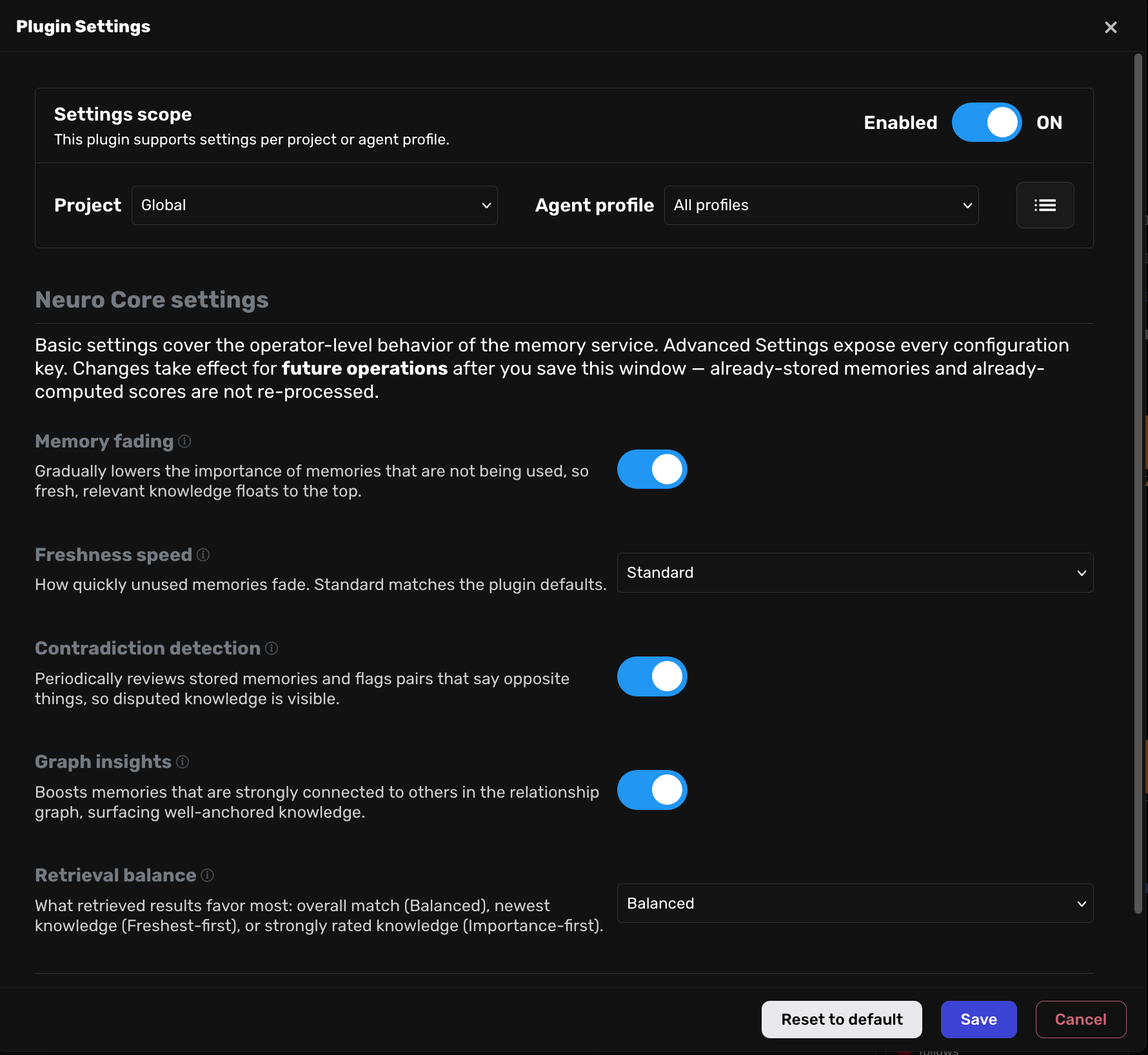
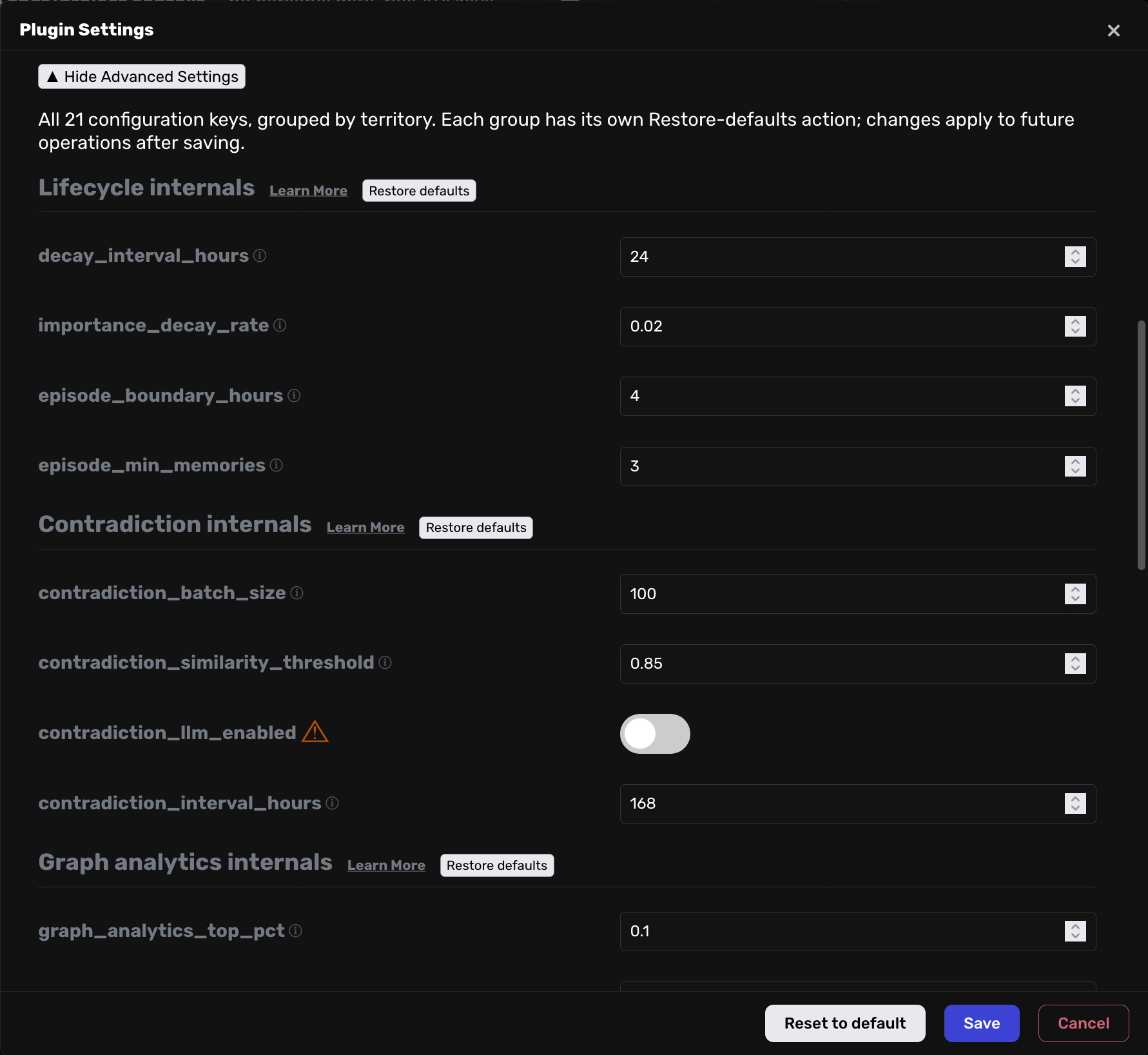
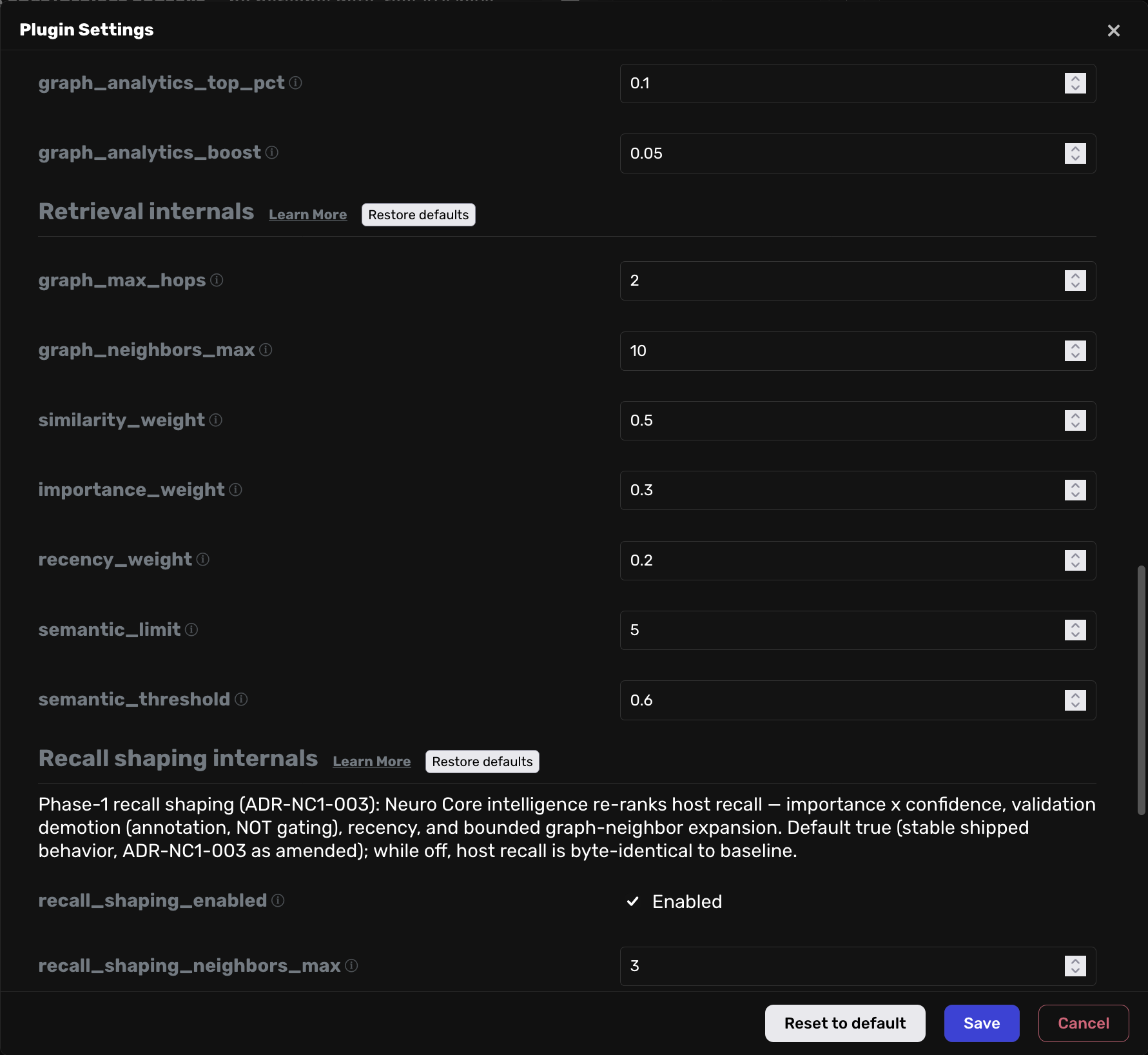
<div align="center"><img alt="Neuro Core settings window with basic operator controls" src="docs/screenshots/shot_3_basic_settings.png" width="90%" /><img alt="Advanced settings covering all 27 configuration keys grouped by territory" src="docs/screenshots/shot_3_advanced_settings.png" width="90%" /><img alt="Retrieval internals and recall shaping settings" src="docs/screenshots/shot_3_advanced_settings_continued-2_of_3.png" width="90%" /></div>Quick Start
- Prerequisites — a running Agent Zero instance (Docker or local)
with the built-in
_memoryplugin available, and Python 3.12+. - Place the plugin — put this directory at
/a0/usr/plugins/neuro_core/. - Enable the plugin — open Agent Zero's settings and switch the
Neuro Core plugin on in the plugin settings UI. Enabling runs the
plugin's install hook, which installs
networkx(one-time, printed in the logs). - Verify the installation — after enabling, confirm that:
- the Neuro Core entry appears in the sidebar quick actions, and
- the Neuro Core surface is registered on the right canvas at session start (rail entry 'Neuro Core', icon 'hub', order 50) and does not require sidebar activation, and
- the graph panel opens from the right canvas, and
- the plugin's settings window opens from the plugin settings UI.
If any of these fail, check the Agent Zero logs for
[neuro_core]messages.
- Configure — configuration lives in
default_config.yamland can be overridden per project and per agent; seedocs/configuration.md.
60 seconds after install: ask your agent to remember something, ask it to recall it a few turns later, then open the Context Graph from the sidebar and find it on the graph. That's the whole loop — capture, recall, see.
<details> <summary><strong>Upgrading from an existing memory store? Run the migration</strong></summary>The plugin ships a one-shot migration script, execute.py, at the
plugin root. It runs only when you trigger it — through the plugin
manager's execute action for Neuro Core in the Agent Zero WebUI, or
manually from the Agent Zero root with:
python -m usr.plugins.neuro_core.execute
When do you need to run it? After installing or updating the plugin (for example, when a plugin update tells you its data format changed, or when support asks you to run the migration). Running it again is always safe.
What it does: brings pre-existing Agent Zero memories up to the
Neuro Core schema — the typed memory_type field, the three score
fields (importance / confidence / stability), and the
validation_status field. The migration is non-destructive
(existing values are never overwritten) and fail-closed: if the
read-only pre-migration inspection cannot confidently determine a
store's state, it never guesses — it falls back to the full,
authoritative migration path. This safety behavior is a durable
contract recorded in
docs/decisions/ADR-NC1-005-framework-compatibility-contract.md.
How It Works
The Six Tools
Everything your agent can do with memory, in six verbs:
| Tool | Purpose |
|---|---|
neuro_capture |
Capture a memory with typed metadata |
neuro_retrieve |
Scoped hybrid retrieval with a context graph |
neuro_validate |
Validate or dispute a memory |
memory_score |
Update importance/confidence/stability and validation status |
memory_relate |
Create or remove typed graph relationships |
memory_reflect |
Reflect over an episode of memories |
See docs/tools.md for per-tool behavior and arguments.
HTTP API
Eight handler modules serve the WebUI and external integrations under
/api/plugins/neuro_core/:
| Endpoint group | What it does |
|---|---|
context_graph |
Hybrid retrieval returning a serialized ContextGraph |
relationships |
List, create, and delete typed graph edges |
advanced_filters |
Filtered graph queries — by memory type, score, and validation status |
memory_names |
User-assigned Memory Name aliases and custom Cluster names |
memory_edit |
Safe-mode editing of one memory's contents, scores, and types, with server-side validation-status transition rules and a full activity ledger |
episode_audit |
Episode listing and detail for the WebUI episode audit view |
reflection_audit |
Reflection-memory audit views |
memory_subdirs |
Discovers the memory scopes (standard and project) available to the panel |
See docs/api.md for routes, parameters, and response schemas.
WebUI
- Context Graph panel — an interactive graph of your memories on the right canvas. Its graph library is vendored locally and served by the plugin itself: no external CDN, no extra network requests — your memory graph loads offline and stays that way.
- Sidebar quick-action entry — one click from the Agent Zero sidebar opens the graph.
- Settings window — the standard Agent Zero plugin-settings modal, with Basic operator-level controls and an Advanced section covering every configuration key, plus a built-in configuration help surface linked from it.
Lifecycle jobs
Three scheduled maintenance jobs keep the graph healthy — importance
decay, episode grouping, and contradiction detection — alongside
memory-creation/search hooks and automatic graph cleanup. See
docs/architecture.md for the full wiring.
Memory Operator profile
The Memory Operator profile is an opt-in agent profile that gives an
agent coherent operating discipline for Neuro Core memory work: scope
semantics, tool error contracts, the validation lifecycle,
ranking-factor interpretation, and the boundary between what the plugin
maintains automatically and what the agent operates itself
(assisted-manual curation — never end-to-end automatic memory
management). Selecting the profile is opt-in; when it is not selected,
agent behavior and tool availability are unchanged. If a user-level
profile of the same name exists, it overrides the plugin profile's
prompt keys per-key, and metadata keys it leaves unset are inherited
from the plugin profile. See
docs/decisions/ADR-NC1-006-memory-operator-profile.md.
Data and privacy
Neuro Core is designed so your memory data stays where you put it, in formats you can inspect and delete. It stores data in three places:
neuro_core.db— the plugin's SQLite domain database. By default it lives in the plugin directory; thedatabase_pathconfiguration key controls the location (relative paths resolve plugin-relative, absolute paths are honored verbatim).- Sidecar files —
scores.json(importance/confidence/stability and access counts) andrelationships.json(the typed relationship graph), stored alongside the plugin's data. - The host memory store — memory contents and their metadata live in Agent Zero's own FAISS-based memory store, exactly like ordinary Agent Zero memories. Neuro Core reads and enriches that store; it does not duplicate memory content into a second database.
Egress disclosure: memory content is sent to whatever embedding provider your Agent Zero configuration uses (memory storage and retrieval rely on embeddings). Neuro Core adds no additional network egress of its own, but using it means your memory content is processed by that embedding provider, exactly as with plain Agent Zero memory.
Deleting your data:
- To delete everything Neuro Core persists, stop Agent Zero and remove
the plugin's data files: the SQLite database at the configured
database_path(by defaultneuro_core.dbin the plugin directory) and thescores.json/relationships.jsonsidecars next to it. - Memories themselves (including Neuro Core's metadata on them) live in the host memory store; delete them through Agent Zero's own memory management, or remove the host memory directory, depending on how much you want to erase.
Uninstalling / removing the plugin
- The plugin's
uninstall()hook is intentionally a no-op: it does not remove pip packages (other plugins may share them) and does not delete your data. - Removing the plugin directory (
/a0/usr/plugins/neuro_core/) is the uninstall. Agent Zero's plugin manager removes the plugin files when you uninstall it through the UI; deleting the directory manually achieves the same result. - What remains on disk after removal:
- the SQLite database (
neuro_core.dbat the configureddatabase_path) — contains the plugin's domain data; - the
scores.jsonandrelationships.jsonsidecars; - the
networkxpip package installed at enable time (harmless to leave; remove withpip uninstall networkxif you want a fully clean environment).
- the SQLite database (
- Safe-removal guidance: back up or explicitly delete the database and sidecar files listed above if you do not want residual data left behind. Do not delete files inside the Agent Zero framework itself.
Quality & validation
Neuro Core ships with 1,129 passing tests, including runtime-exposure checks that verify tool responses, API error payloads, and serialized graph output contain no internal paths or identifiers. See Architecture §8 for the documentation guard's scope.
Documentation
| I want to... | Start here |
|---|---|
| Understand each agent tool | docs/tools.md |
| Integrate with the HTTP API | docs/api.md |
| Understand the architecture and data flow | docs/architecture.md |
| Configure the plugin | docs/configuration.md |
| Understand storage and the data model | docs/data-model.md |
| Read architecture decision records | docs/decisions/README.md |
| Produce a distribution artifact | packaging/export-manifest.md |
| Track changes | CHANGELOG.md |
| Contribute | CONTRIBUTING.md |
Support
Issues and feature requests: github.com/thirdeyenation/Neuro-Core/issues. Please include your Agent Zero version, the Neuro Core version, steps to reproduce, and expected vs. actual behavior.
Tests
Run the full suite with the committed wrapper (it sets PYTHONPATH=/a0 and
runs from the plugin root automatically; extra pytest args are forwarded):
/a0/usr/plugins/neuro_core/tests/run_suite.sh
See CONTRIBUTING.md for contribution requirements.
License
MIT — Copyright (c) 2026 Neuro Core Contributors.