
OSCAR Gateway
Connects authorized Agent Zero profiles as private OSCAR buddies, with a WebUI Buddy List, live profile and Mesh observability, persistent conversations, bounded recovery, and private Tailscale connectivity.
Screenshots
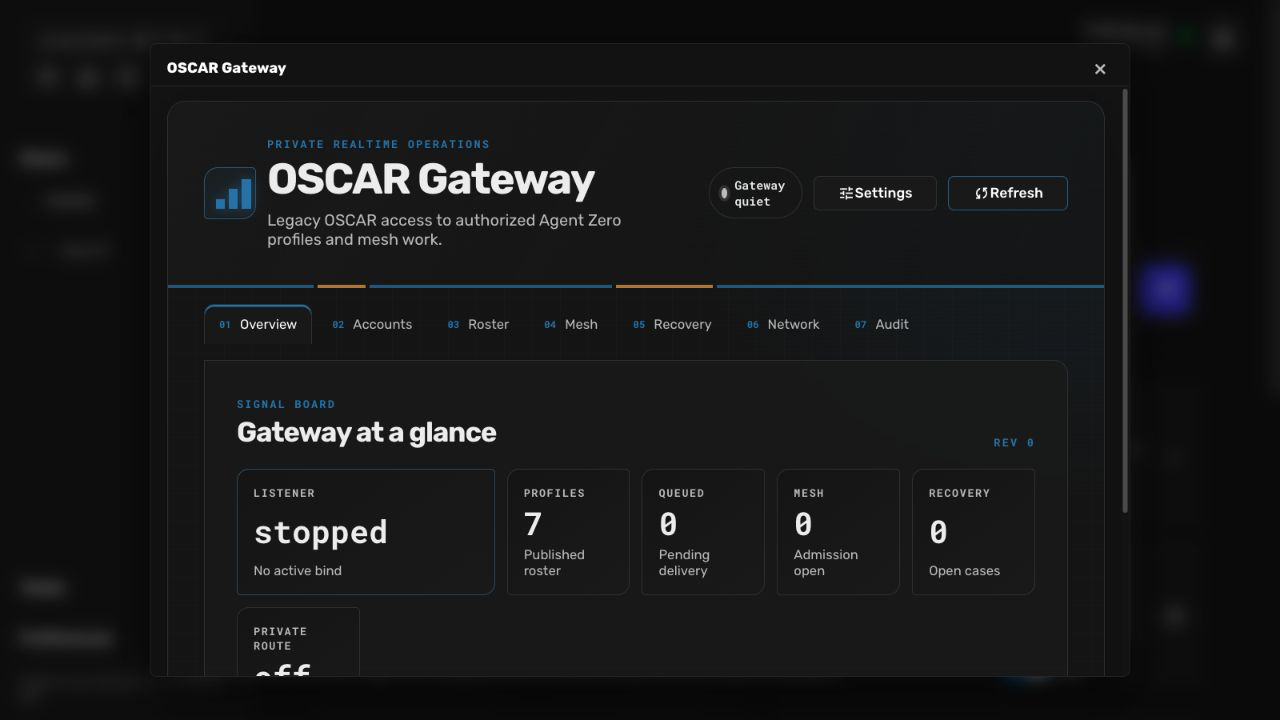
README
OSCAR Gateway
OSCAR Gateway is a custom Agent Zero plugin that exposes authorized Agent Zero profiles as stable AIM buddies, carries private one-to-one OSCAR messages into persistent Agent Zero contexts, and provides a durable, bounded agent mesh.
Release status: release candidate. AIM 5.9.6089 and Pidgin 2.12 are target/manual-gate clients, but neither client is compatibility-certified yet. The deterministic client and automated suite cannot substitute for the real client gates in the manual runbook.
The fail-closed defaults keep the listener, managed Tailscale integration, and profile autonomy off. Mesh services are available after plugin activation, but new mesh work remains subject to current grants, policy, and the durable A0Mesh pause flag.
Start here
OSCAR Gateway supports three related workflows. You can use the first one without configuring a legacy AIM client or opening a network listener.
| Goal | What to configure |
|---|---|
| Chat with Agent Zero profiles from the WebUI | Enable the plugin, open an Agent Zero chat, then open Buddies in the right canvas. No OSCAR account or listener is required. |
| Connect Pidgin or AIM | Create an OSCAR account, grant exact published profiles, choose a network mode, then enable the listener. |
| Delegate work through Agent Mesh | Keep mesh.enabled on, grant only the required Mesh permissions to external accounts, and use the oscar_mesh tool or the A0Mesh control buddy. |
The important names used throughout this guide are:
- profile endpoint: one exact global profile or project/profile pair;
- buddy: the stable OSCAR alias published for an endpoint;
- OSCAR account: a login used by an external AIM-compatible client;
- A0Mesh: the virtual control buddy for observing and controlling authorized Mesh work;
- Buddy List: the plugin-owned Agent Zero canvas showing published profiles, live presence, and bounded Mesh metadata.
Recommended reading order:
- Install the plugin.
- Follow the quick start.
- Read Network modes and tunneling before allowing a client outside Agent Zero's container.
- Read Agent mesh before granting Mesh permissions or enabling autonomy.
- Use the troubleshooting table and manual runbook for release or compatibility work.
Scope and core boundary
Release 0.1.0 implements the OSCAR messaging vertical slice needed by the two target clients:
- legacy MD5 challenge authentication and a combined auth/BOS listener;
- service negotiation, SSI roster delivery, and buddy presence;
- one-to-one ICBM channel 1 text, acknowledgements, durable inbound deduplication, reconnect delivery, Unicode handling, and bounded long-message chunks;
- all enabled global Agent Zero profiles and enabled project-local profile variants from active projects;
- a private persistent human context for each exact account/profile endpoint pair;
- a durable agent mesh, the
A0MeshOSCAR control buddy, bounded recovery, and configurable per-endpoint autonomy; - loopback, explicit trusted-CIDR networking, and private raw-TCP Tailscale Serve.
It does not implement file transfer, chat rooms, public Internet exposure, Tailscale Funnel, public tunnel providers, or compatibility promises for newer OSCAR clients.
All runtime code, hooks, APIs, tools, prompts, WebUI assets, SQLite state, and
Tailscale ownership records live under usr/plugins/oscar_aim. The plugin uses
published Agent Zero extension, hook, API, tool, project, profile, and context
interfaces; it does not patch agent.py, initialize.py, or another Agent Zero
core file. The plugin also installs no Python package: backend verification uses
the existing framework runtime at /opt/venv-a0.
Compatibility matrix
| Client or harness | Intended coverage | Current status |
|---|---|---|
| Deterministic standard-library client | Automated auth/BOS, service, SSI, presence, ICBM, malformed input, restart, dedupe, and tunnel fixtures | Automated harness; not a real-client certification |
| Pidgin 2.12 | Legacy MD5 with transport encryption disabled, direct trusted path, and private Tailscale Serve | Target/manual gate; not compatibility-certified yet |
| AIM 5.9.6089 | Corrected nested-MD5 login, combined-port redirect, direct trusted path, and private Tailscale Serve in an isolated legacy OS | Target/manual gate; not compatibility-certified yet |
| Other OSCAR clients | No declared coverage | Unsupported until added to the matrix and gated |
A release can be labeled compatibility release ready only after every
mandatory deterministic, Pidgin, AIM, mesh, recovery, tunnel, update, and
uninstall gate is recorded as passing. An unavailable real client, an unrun
mandatory gate, or a failing assertion keeps the label at release candidate.
Install the plugin
Plugin Hub or Git installer
If OSCAR Gateway appears in your Agent Zero Plugin Hub:
- Open Plugins from the dashboard or sidebar.
- Open Browse or Install, search for
OSCAR Gateway, and select it. - Review the source link, README, requested behavior, and publisher.
- Choose Install, then enable
oscar_aimin the installed plugin list.
If the entry is not yet present in your Plugin Hub index, use the same Install window's Git tab. Enter this repository URL and choose Clone & Install:
https://github.com/TerminallyLazy/oscar_aim.git
The installer validates the plugin and places it under
usr/plugins/oscar_aim. A private-repository access token is not required for
the public URL above. Always verify the publisher and URL through a trusted
channel before installing third-party code.
Command-line install
The source tree must be the direct plugin directory, not one level below it.
Run these commands in the Agent Zero environment, replacing /a0 if that is not
the actual Agent Zero root:
cd /a0
test ! -e usr/plugins/oscar_aim
PLUGIN_REPOSITORY_URL='https://github.com/TerminallyLazy/oscar_aim.git'
git clone -- "$PLUGIN_REPOSITORY_URL" usr/plugins/oscar_aim
test "$(git -C usr/plugins/oscar_aim rev-parse --show-toplevel)" = "/a0/usr/plugins/oscar_aim"
Verify the publisher and repository URL through a trusted channel before
installing. Pin and record the exact plugin commit used for a release gate. Do
not force-add this custom plugin to the parent Agent Zero repository; usr/ is
intentionally local runtime state.
Before activation, validate the package with Agent Zero's framework runtime:
cd /a0
/opt/venv-a0/bin/python -c "from plugins._plugin_installer.helpers.install import validate_plugin_dir; meta = validate_plugin_dir('/a0/usr/plugins/oscar_aim', 'oscar_aim'); print(meta.model_dump())"
/opt/venv-a0/bin/python -c "import usr.plugins.oscar_aim; import usr.plugins.oscar_aim.helpers.runtime; import usr.plugins.oscar_aim.hooks"
node --check usr/plugins/oscar_aim/webui/oscar-store.js
git -C usr/plugins/oscar_aim fsck --no-progress
Start Agent Zero with the framework runtime, read the actual WebUI URL from its
startup output or Docker mapping, and enable oscar_aim in the plugin manager:
cd /a0
/opt/venv-a0/bin/python run_ui.py
Do not assume a WebUI port.
Updating
Prefer Agent Zero's plugin update action because it invokes the plugin's
pre_update and post-update install hooks. The pre-update hook fences new work,
stops the listener and exact durable tunnel, cleans only plugin-owned transient
paths, and leaves the current database for the migration hook.
For a standalone Git update, first use Network > Stop, wait for exact cleanup, stop the Agent Zero process, verify the remote and branch through a trusted channel, and only then fast-forward the plugin checkout:
cd /a0
git -C usr/plugins/oscar_aim status --short
git -C usr/plugins/oscar_aim remote -v
PLUGIN_REMOTE='replace-with-verified-remote'
PLUGIN_BRANCH='replace-with-verified-branch'
git -C usr/plugins/oscar_aim pull --ff-only "$PLUGIN_REMOTE" "$PLUGIN_BRANCH"
If no verified remote exists, replace the stopped source tree from a verified artifact instead of inventing one. On restart, keep the listener disabled while the install hook validates the owned data boundary and runs migrations. Then repeat the framework-runtime checks and the update gates. The pre-v3 reset boundary below is an exception to normal in-place persistence.
Quick start
1. Enable the plugin safely
Enable oscar_aim from Agent Zero's installed plugin list. The shipped defaults
do not open a network port: server.enabled and tailscale.managed are false,
and endpoint autonomy is off. Activation initializes the plugin database and
discovers enabled Agent Zero profiles.
Open the OSCAR Gateway dashboard and check:
- Roster contains the global profiles you expect and any enabled project-local variants;
- Network reports the listener stopped and no plugin-owned tunnel;
- Recovery has no unresolved startup or storage case.
2. Use the Agent Zero Buddy List
Open any Agent Zero chat, then choose Buddies from the right-canvas toolbar. On a narrow screen, the same control opens a modal window.
- Select a profile to open its exact Agent Zero chat.
- Select it again to return to the same Buddy List-created chat during the current WebUI session.
- Watch the presence badge for Available, Running, Paused, Recovering, Needs attention, Offline, or stale status.
- Expand A0Mesh to see bounded route states and recovery counts.
This local WebUI workflow needs no OSCAR account, client password, listener, or tunnel.
3. Create an external client account (optional)
Only complete this step when connecting Pidgin, AIM, or another controlled OSCAR client.
- In Accounts, create a legacy-safe screen name with grant mode
scoped. - Copy the generated password into an approved password manager immediately. It is shown once; the plugin stores only verifier material.
- In Roster, review the stable aliases and endpoint IDs.
- Use Replace access set to save the account's complete intended endpoint grants and Mesh permissions atomically.
A scoped account implicitly sees published AgentZero; every other real
profile needs an explicit endpoint grant. all_profiles intentionally grants
every current and future published real endpoint. It does not reveal an
unpublished endpoint and does not grant any A0Mesh permission.
Grant Mesh access separately and by need:
mesh_observeshowsA0Meshand authorized metadata;mesh_controladditionally allows confirmation, pause/resume, and cancel;mesh_contentreveals authorized task content for lineages that account already owns.
4. Choose the connection path
Keep server.enabled: false until account grants and network settings are
reviewed. Choose one path:
| Client location | Mode | Operator responsibility |
|---|---|---|
| Same network namespace as Agent Zero | loopback |
Use the loopback listener directly. In Docker, the host and container do not share loopback. |
| Docker host or controlled LAN/VPN | trusted_network |
Add only the narrow source CIDR the listener actually sees, publish the matching TCP port explicitly, and keep the host firewall closed to other networks. |
| Another device on a private tailnet | tailscale_private |
Use private raw-TCP Tailscale Serve, either operator-managed or the plugin's exact managed rule. Never use Funnel. |
Read Network modes and tunneling before changing the mode. Then save the global plugin configuration, enable the listener, and confirm Network reports the intended bound and advertised address. Do not publish this legacy protocol to the public Internet.
5. Configure and test the client
Use the account's screen name and one-time password, the gateway's advertised host, and the selected external TCP port. For the Pidgin 2.12 target, use its legacy AIM account type and disable transport encryption for this controlled compatibility path. Run AIM 5.9.6089 only in an isolated legacy environment. Exact client settings and evidence fields are in the manual compatibility runbook.
Verify the smallest path first:
- The client authenticates and shows only its authorized buddy roster.
- Sending a short message to one buddy creates or resumes that account's private endpoint context in Agent Zero.
- The Agent Zero response returns to the same client conversation.
- Reconnect once and confirm the message is not executed twice.
- If Mesh access was granted, send
statustoA0Mesh; do not begin with a control mutation.
Keep the release label at release candidate until the real Pidgin, AIM, Mesh, recovery, and tunnel gates in the runbook are recorded as passing.
Agent Zero Buddy canvas
The plugin registers a Buddies surface in Agent Zero's right canvas without modifying Agent Zero core files. It lists every published global and project profile endpoint, shows live available/running/paused/recovering/error/offline presence, counts bounded active routes, signals stale snapshots, and keeps recent A0Mesh task and recovery metadata alongside the main chat. The same plugin hooks observe ordinary WebUI profile runs and OSCAR-, Mesh-, recovery-, and autonomy-owned runs; overlapping contexts remain busy until the last exact run finishes. This activity surface reads profile identity and bounded route metadata only. It never displays prompt, response, objective, or result text.
Selecting a real buddy opens or returns to an Agent Zero chat for that exact agent profile and activates its exact project when the endpoint is project-scoped. The Agent Zero WebUI session is the authority for this local navigation; it does not mint or reuse an OSCAR account credential.
At mobile widths the same surface opens as a floating modal. External AIM, Pidgin, and OSCAR Buddy clients remain separate protocol sessions and continue to see only the roster authorized for their own OSCAR account.
Configuration model
default_config.yaml is the shipped baseline. Agent Zero stores sparse JSON
configuration documents for global, profile, project, and exact
project/profile scopes. Each document is bounded to 65,536 bytes of canonical
JSON, rejects unknown fields, and is validated before it is accepted.
Effective endpoint policy is composed broad to narrow:
- shipped defaults;
- global plugin configuration;
- profile-only configuration;
- project-only configuration;
- exact project/profile configuration.
Objects merge by field. Lists replace the inherited list; they do not append to it. Every intermediate effective configuration is parsed, so a narrower valid value cannot hide an invalid broader document.
Only these fields are legal in a scoped document:
profiles.published,profiles.display_text,profiles.status_text, andprofiles.show_task_titles;mesh.default_repair_profile,mesh.diagnosis_attempts,mesh.repair_attempts, andmesh.retry_attempts;- every
autonomy.*field.
Listener, Tailscale, audit, profile-refresh, project-publication, and global mesh admission ceilings are process-wide and therefore global-only.
Server fields
| Field | Default | Operator contract |
|---|---|---|
server.enabled |
false |
Opens the listener only while the plugin is also enabled and Network Stop is not latched. Turning it off stops the listener and exact owned tunnel. |
server.mode |
loopback |
One of loopback, trusted_network, or tailscale_private. |
server.bind_host |
127.0.0.1 |
Local bind. Loopback mode requires a loopback host; Tailscale mode requires exactly 127.0.0.1. A wildcard trusted bind requires an explicit non-loopback advertised host. |
server.port |
5190 |
Listener port, 1-65535. This is also the actual managed Serve target port after binding. |
server.advertise_host |
empty | Host placed in the BOS redirect. Remote modes require a usable non-loopback host. In Tailscale mode, leave it empty or make it exactly match the canonical tailscale.advertise_host. |
server.allowed_cidrs |
[] |
Required in trusted_network. Source IPs outside these normalized CIDRs are rejected before protocol admission. Catch-all /0 networks are forbidden. |
server.max_frame_bytes |
16384 |
Maximum FLAP payload, 1,024-65,535 bytes. |
server.max_message_bytes |
8000 |
Maximum decoded inbound message and outbound chunk budget, 256-32,000 bytes. |
server.keepalive_seconds |
60 |
Server keepalive interval, 15-600 seconds. |
server.idle_timeout_seconds |
180 |
Connection idle deadline, 30-3,600 seconds. |
server.auth_timeout_seconds |
20 |
Authentication deadline, 5-120 seconds. |
server.max_sessions |
32 |
Total concurrent listener sessions, 1-1,024. |
server.max_sessions_per_ip |
4 |
Concurrent sessions for one observed source IP, 1-64. |
Profile fields
| Field | Default | Operator contract |
|---|---|---|
profiles.refresh_seconds |
15 |
Validated global compatibility field, 5-3,600. The current runtime reconciles candidates on Agent Zero framework job-loop ticks; this value does not create an independent timer in 0.1.0. |
profiles.publish_project_variants |
true |
Globally enables discovery of enabled project-local profiles in active projects. It does not clone every inherited global profile into each project. |
profiles.published |
true |
Effective endpoint visibility and route admission. false hides and denies the endpoint while retaining its persisted identity. |
profiles.display_text |
empty | Optional roster display override; empty uses the discovered profile title. Maximum 128 characters and 512 UTF-8 bytes. |
profiles.status_text |
empty | Optional public status text, maximum 96 characters and 96 UTF-8 bytes. |
profiles.show_task_titles |
false |
Opt-in exposure of current task titles in presence metadata. Keep off when titles may contain private data. |
Mesh fields
| Field | Default | Operator contract |
|---|---|---|
mesh.enabled |
true |
Global admission switch for new mesh execution. It does not open the OSCAR listener. |
mesh.max_hops |
4 |
Immutable root-lineage hop ceiling, 1-16. Child creation also rejects repeated endpoints and cycles. |
mesh.max_concurrency |
4 |
Shared mesh/recovery context capacity, 1-64. |
mesh.default_deadline_seconds |
900 |
Root task deadline, 30-86,400 seconds; children inherit the root deadline. |
mesh.default_repair_profile |
developer |
Effective profile key used for bounded diagnosis and repair proposals. It must remain a current executable endpoint inside the immutable authority snapshot. |
mesh.diagnosis_attempts |
1 |
Effective diagnosis budget, 1-4. |
mesh.repair_attempts |
2 |
Effective deterministic-repair budget, 0-8. |
mesh.retry_attempts |
2 |
Effective safe retry/reconciliation budget, 0-8. |
Tailscale fields
| Field | Default | Operator contract |
|---|---|---|
tailscale.managed |
false |
When true in tailscale_private, the plugin may reconcile one exact private raw-TCP Serve rule and, if necessary, one identity-tracked userspace daemon. |
tailscale.external_port |
5190 |
Advertised tailnet and Serve port, 1-65,535. |
tailscale.local_port |
5190 |
Validated compatibility field. In 0.1.0 the managed target always uses the listener's actual bound_port; changing this field does not redirect Serve elsewhere. Externally managed mode also does not consume it. |
tailscale.advertise_host |
empty | Canonical private advertised host. Required when managed is false; optional in managed mode, where a safe tailnet DNS name or IP may be discovered. Do not put a public host here. |
Audit fields
| Field | Default | Operator contract |
|---|---|---|
audit.include_content |
false |
Accepted global policy field. The current AuditService always sanitizes content and secrets; setting this to true does not enable raw content storage in 0.1.0. |
audit.retention_days |
30 |
Validated global policy field, 1-3,650. Automatic age-based pruning is not implemented in 0.1.0, so do not treat this value as a deletion guarantee. |
The authenticated status API exposes only audit event metadata. It does not serialize verifier material, challenges, cookies, credentials, raw frames, prompts, unrestricted exceptions, or task content.
Autonomy fields
Autonomy policy is effective per real endpoint and inherits through the scope order above.
| Field | Default | Operator contract |
|---|---|---|
autonomy.mode |
off |
off, event_driven, scheduled, or hybrid. Any enabled mode requires a non-empty mission. |
autonomy.mission |
empty | Bounded system mission for that endpoint, up to 4,096 characters. It is not extra authority. |
autonomy.allowed_events |
[] |
Up to 100 unique event codes matching lowercase safe-code syntax. The shipped producer emits task.completed and task.failed; another syntactically valid code does not create an external event integration. |
autonomy.allowed_targets |
[] |
Up to 1,024 current stable OSCAR aliases. At each wake they resolve case-insensitively to executable real endpoints and become an immutable endpoint-ID grant snapshot. |
autonomy.interval_minutes |
60 |
Scheduled interval, 1-10,080 minutes, used when daily_at is empty. |
autonomy.daily_at |
empty | Optional exact HH:MM daily time. When set, it replaces interval scheduling for that endpoint. |
autonomy.quiet_hours_start |
empty | Exact HH:MM; must be set together with quiet_hours_end. |
autonomy.quiet_hours_end |
empty | Exact HH:MM; must be set together with quiet_hours_start. Equal start/end means the entire day is quiet. |
autonomy.timezone |
UTC |
IANA timezone used for daily schedule, quiet hours, and daily budget. |
autonomy.max_concurrent_tasks |
1 |
Per-autonomy-principal active root ceiling, 1-16, still bounded by global mesh capacity. |
autonomy.daily_task_budget |
4 |
Per-endpoint daily admission budget, 1-1,000. Pending confirmation intents are also bounded by this value. |
autonomy.cooldown_seconds |
300 |
Minimum delay after a reservation, 0-86,400 seconds. Exact duplicate event hashes are also suppressed. |
autonomy.require_confirmation |
true |
When true, every non-read_only autonomous task becomes a durable human confirmation request before task admission. |
Scheduled and event wakes never bypass current endpoint publication, stable target resolution, pause state, hop/cycle policy, deadline, capacity, budget, cooldown, or confirmation. Autonomy and recovery work do not recursively emit new autonomy terminal wakes.
Profiles, aliases, grants, and private contexts
All effective profiles
Global discovery includes every enabled profile returned by Agent Zero's global
profile registry, including default, plugin-provided, and user-provided
profiles. With publish_project_variants: true, the plugin also scans active
projects and adds only enabled project-local profile definitions. An inherited
global profile is not duplicated merely because a project can use it.
The durable endpoint keys distinguish identity:
global:<encoded-profile-key>
project:<encoded-project-key>:<encoded-profile-key>
virtual:mesh-control
Therefore a global profile and a project-local profile with the same profile key are different endpoints, aliases, grants, policies, and private contexts. Project-qualified endpoints activate their exact project before the first chat is persisted.
For account visibility:
scopedsees the publishedAgentZeroendpoint plus explicitly granted, published real endpoint IDs;all_profilessees every published real endpoint, including newly discovered ones;A0Meshis virtual and becomes visible only withmesh_observe;published: falsedenies roster visibility and new route execution in every grant mode.
Stable aliases, tombstones, and relink
OSCAR aliases are persisted printable ASCII identities matching
[A-Za-z][A-Za-z0-9]{0,15}. AgentZero and A0Mesh are reserved. Other
aliases begin with a readable profile/project form; collisions or overlength
names receive a deterministic digest suffix. Endpoint UUID and alias are
stable across ordinary refreshes, restarts, and v3-compatible updates.
When a discovered endpoint disappears, the registry marks it offline and creates an alias tombstone. The tombstone prevents that alias from being silently reassigned. If the exact endpoint key returns, its prior UUID and alias return to service.
Relink is explicit and never guessed. In the Roster tab, an administrator may relink only an endpoint that is offline, missing, and owns its tombstone to one exact currently discovered endpoint key that is not already persisted. The transaction preserves the old endpoint UUID and alias, updates its scope/profile identity, and removes the matching tombstone. Review all existing grants and contexts after an intentional relink because they now follow that preserved identity.
Account/profile context privacy
The plugin persists exactly one context binding for each
(account_id, endpoint_id) pair. Two accounts messaging the same profile get
separate Agent Zero chats. A global endpoint and its project-qualified variant
also get separate chats. The binding is reused for later messages so the human
has continuity only inside that exact pair.
Route metadata alone is never authority. Before dispatch, tool use, completion, or fault handling, the bridge revalidates the live context object, current delivery generation, persisted binding, enabled account, current grant, published executable endpoint, and exact endpoint identity. If the context is removed or mismatched, the binding is invalidated and no unrelated context is adopted.
Only a final response logged after the currently correlated OSCAR dispatch can become that delivery's outbound reply. Background output, another context's response, and stale metadata are not exported to the human account.
Credentials and transport security
Account creation and rotation generate a cryptographically random,
compatibility-safe 16-character password with Python's secrets module. The
API returns it in exactly one successful response. The dashboard holds it in an
ephemeral modal; copying or closing clears the browser store. Account lists and
audit history never return it. There is no password-recovery operation.
Only the 32-hex MD5 password verifier is persisted. Rotation replaces that verifier immediately, so the old password no longer authenticates. If a credential is lost, rotate it; if access should stop, disable the account. Never reuse an OSCAR password for Agent Zero, Tailscale, email, or any other system, and never paste it into logs, screenshots, captures, issues, or manual results.
OSCAR is plaintext legacy transport. The MD5 challenge flow avoids sending the password itself, but it does not encrypt roster data or messages and it is not a modern password-authenticated protocol. Anyone who can observe the raw path can read message content. A captured challenge/digest or a copy of the persisted verifier permits offline password guessing. Treat
data/oscar.sqlite3and its backups as credential-bearing private data. Use the generated high-entropy password, never a human-chosen or reused one.
Loopback reduces the path to the local network namespace. Trusted-network mode relies on the operator's LAN/VPN, firewall, and Docker boundary. Private Tailscale Serve encrypts the tailnet segment, but OSCAR remains plaintext at the client and local listener endpoints.
Unknown, disabled, malformed, and wrong-password logins use generic failures and rate-limited admission; they are not an account-enumeration interface.
Agent mesh
The mesh is a durable delegation broker, not a prompt convention. A profile can
use the native oscar_mesh tool to send a bounded task to another authorized
profile, inspect or cancel owned work, and return a correlated result. The
model supplies only task intent fields; source identity, principal, grants,
permissions, lineage, reply route, and claim ownership are derived from an
exact live plugin context.
flowchart LR
    H["Authenticated OSCAR account"] --> S["Source profile context"]
    S --> B["Durable mesh broker"]
    B --> T["Authorized target profile"]
    T --> C["Optional bounded child"]
    T --> R["Correlated reply route"]
    C --> R
    B --> M["A0Mesh metadata and control"]
    B --> F["Recovery supervisor"]
    A["Per-endpoint autonomy principal"] --> B
Principals and immutable lineage
The broker recognizes three persisted principal kinds:
human: the authenticated OSCAR account UUID, with the account's exact endpoint-grant and mesh-permission snapshot;autonomy: the source endpoint UUID, with targets resolved from that endpoint's configured stable aliases at wake time;gateway-recovery: the internal bounded recovery executor, which carries no human mesh permissions and cannot become general user authority.
A child delegation does not create a broader principal. It preserves the root's principal, immutable endpoint-ID grant snapshot, permissions, lineage ID, deadline, recovery policy, and reply visibility. It adds a parent task ID, increments the hop count, and extends the visited endpoint path. Repeated endpoints, source-equals-target, unauthorized targets, expired deadlines, and hop-budget exhaustion fail before a child context is created.
Each envelope also freezes objective, success contract, effect class,
idempotency key, source and target IDs, evidence references, and response route.
Effect classes are read_only, idempotent, reconcilable, and unknown.
They determine whether retry is safe and whether autonomous work requires human
confirmation.
Task states are:
queued -> accepted -> running -> completed
                         |-> fault_detected -> diagnosing -> repairing
                         |                    -> retrying -> reconciling
                         |                    -> needs_attention / failed
                         |-> cancelled
Transitions and claims are persisted transactionally. Stable idempotency keys
deduplicate repeated send_task intent. On restart, the broker reconciles
owned attempts, reply injections, recovery work, and autonomy leases before it
admits new work.
Native oscar_mesh operations
Profiles receive four tool operations:
send_taskwithtarget,objective,success_contract,effect_class, and a stableidempotency_key;inspectwith a task ID;cancelwith a task ID;replywith the current task result.
The target is a current OSCAR alias. No operation accepts a caller-supplied
principal, source, grant list, lineage, or reply context.
A0Mesh control buddy
An OSCAR account with mesh_observe sees the reserved A0Mesh buddy and can
send these exact commands:
status
tasks [1-20]
why <task-id>
confirmations [1-20]
approve <request-id>
deny <request-id>
pause [generation]
resume [generation]
cancel <task-id>
mesh_observe permits status, principal-scoped task metadata, and why.
mesh_control is additionally required for confirmation decisions,
pause/resume, and cancellation. mesh_content permits authorized objective,
contract, result, diagnosis, and repair-plan text where the principal already
owns the lineage; without it, inspection is metadata-only. The optional pause
generation is an optimistic concurrency fence. Control responses are stored
transactionally and replayed exactly once for an exact inbound control route.
The durable A0Mesh pause blocks new mesh and autonomy admission. It does not disable the OSCAR listener or interrupt ordinary human/profile chat.
Recovery
When a task, listener, tunnel, delivery, agent execution, tool call, or autonomy lease faults, the supervisor creates or updates a recovery case with a stable case ID, redacted failure class, bounded evidence, generation, state, attempt budgets, and resumable conditions. It preserves the original failure even if a later diagnosis step fails.
For task recovery, the effective default_repair_profile may produce a bounded
diagnosis and repair proposal. Recovery profile contexts are proposal-only:
they do not receive normal tools or subagent delegation. A registered
plugin-owned deterministic repair callback performs the actual mutation and a
separate verifier must return explicit proof. Only then may the supervisor
retry or reconcile an effect class the policy considers safe. Unavailable
authority, an unverifiable repair, an unsafe effect, an external condition, or
an exhausted budget becomes a concrete needs_attention case rather than a
silent broad retry.
Configurable autonomy
Autonomy is disabled by default and configured at the same global/profile/ project/exact scopes as other endpoint policy. Each enabled endpoint has its own principal, mission, schedule or event allowlist, target-alias allowlist, quiet hours, timezone, concurrency ceiling, daily budget, cooldown, and confirmation rule. A wake snapshots executable target IDs and enforcement policy before an Agent Zero context runs. Later alias drift, unpublication, pause, or policy change cannot silently expand that snapshot.
For the safest rollout, enable one endpoint at a time, keep
require_confirmation: true, grant only read_only work until the manual
autonomy gates pass, and verify pause still allows ordinary human chat.
Network modes and tunneling
Loopback
loopback accepts only a loopback bind and loopback peers in the listener's
network namespace. In Docker, container loopback is not host loopback. This
mode is appropriate for in-container testing or a client deliberately placed
in the same namespace; it does not create a host port mapping.
Trusted CIDR
trusted_network requires at least one narrow server.allowed_cidrs entry and
rejects /0. The listener checks the source IP reported to its socket before
protocol admission. In Docker that may be a bridge/NAT address rather than the
client's original address, so inspect the controlled connection path and allow
only the exact network the container actually observes.
The plugin does not edit Compose, publish a container port, change a firewall, restart Docker, create a VPN, or manage a reverse proxy. The operator must add and review an explicit host-to-container TCP mapping when needed, for example a 5190-to-5190 mapping matching the configured listener, and must keep the host firewall/VPN boundary narrow. Do not publish trusted-network mode to the public Internet.
Private Tailscale Serve
tailscale_private always binds the OSCAR listener to exactly 127.0.0.1.
There are two ownership modes:
- With
tailscale.managed: false,tailscale.advertise_hostis required. The plugin assumes an operator-managed private raw-TCP Serve path, labels the daemon and rule external, and never removes them. If Tailscale runs only on the Docker host, the operator must provide a reachable container target and manage the host-side rule; the container plugin cannot safely own it. - With
tailscale.managed: true, the plugin feature-detects private raw-TCP Serve, reads both CLI status and LocalAPI state, waits for a healthy loopback listener, and reconciles one exact external-port-to-actual-bound-port rule. It can borrow a system or Agent Zero daemon without stopping it, or track one plugin-started userspace daemon by exact process identity and owned paths.
Managed mode refuses a conflicting rule and treats an identical pre-existing rule as borrowed. On disable, update, or uninstall it removes only a rule whose exact port, target, daemon identity, and durable fingerprint still match, and stops only an identity-matching plugin-owned daemon. It preserves unrelated Serve configuration and borrowed daemons.
The plugin never runs tailscale serve reset, never changes tailnet ACLs, and
never creates Tailscale Funnel. It has no Cloudflare Tunnel, Microsoft Dev
Tunnel, Serveo, public reverse-proxy, or other public-provider adapter. Remote
support is private tailnet raw TCP only. See the official
Tailscale Serve CLI reference.
Disable, export, uninstall, and cleanup
These controls have different scope:
| Control | Effect |
|---|---|
A0Mesh pause |
Blocks new mesh and autonomy admission; human OSCAR chat continues. |
| Network Stop | Sets a temporary administrative latch and stops the listener and exact owned tunnel. Network Reconcile clears the latch and applies current intent. |
server.enabled: false |
Stops network exposure and exact owned tunnel while plugin storage, roster, dashboard, and mesh services remain available. |
| Plugin toggle off | The runtime self-monitor stops listener/tunnel exposure even if no later extension tick arrives. |
| Plugin update | Runs the lifecycle fence and exact cleanup, preserves a compatible database, then migrates and resumes under the new code. |
| Plugin uninstall | Runs the same exact stop/cleanup hook before Agent Zero removes the plugin directory and its local data. |
Config saves are schema-validated before persistence. Global saves request an orderly process reconcile; scoped saves refresh endpoint presentation, recovery, and autonomy policy. Network resources restart only when their effective process signature changes.
Metadata export
Version 0.1.0 has no one-click file export. Before an update or uninstall, an
authenticated administrator may preserve an operator-owned copy of the
dashboard's redacted status, account list, roster list, mesh/recovery metadata,
network ownership status, and audit metadata. These are the same bounded POST
surfaces used by the WebUI under /plugins/oscar_aim/{status,accounts,roster,mesh,network}.
Use Agent Zero's authenticated/CSRF-protected UI or approved API tooling; do not
weaken those protections for an export.
The redacted surfaces omit one-time passwords, verifiers, challenges, cookies, tokens, raw frames, prompts, unrestricted exceptions, and dashboard task content. A raw SQLite copy is not a metadata export: it contains credential-bearing and potentially private durable state and must be encrypted, access-controlled, and handled as a secret. Manual release results should contain only the non-secret fields allowed by the runbook.
Uninstall procedure
- In Network, choose Stop and wait for
listener=stopped,tunnel=off,rule_owner=none,daemon_owned=false, andcleanup_verified=true. - Resolve any exact listener/tunnel recovery case before deleting files. Never use a global Serve reset as a shortcut.
- Export only the redacted metadata needed for the operator record.
- Use Agent Zero's plugin uninstall action so
hooks.uninstallfences work, stops the runtime, cleans the exact owned Serve rule/daemon, and removes transient paths before directory deletion. - Verify no plugin-owned listener, Serve rule, daemon, PID, socket, symlink, service, or external file remains. Verify borrowed daemons/rules and unrelated Serve entries are unchanged.
- Verify
usr/plugins/oscar_aimand itsdata/oscar.sqlite3are absent only after the plugin manager completes. Do not delete another plugin or Agent Zero core state.
During pre-update cleanup, the database remains while data/runtime and the
plugin-owned data/tailscale/runtime, tailscaled.sock, tailscaled.pid, and
tailscaled.log transients are removed. During uninstall, Agent Zero's plugin
deletion removes the complete plugin directory after the hook succeeds.
Pre-v3 database reset boundary
Pre-v3 local databases are reset-only and incompatible with exactly-once continuity because request identity was never persisted.
Here, “v3” means the inbound delivery deduplication identity domain, not the number of an unrelated SQLite migration. Pre-release v1/v2 identities included the session generation. V3 deliberately excludes it so an exact transport retransmit after fresh BOS authentication remains the same request. Legacy rows store only the resulting hash and ICBM cookie; they do not store the normalized request identity or original session generation needed to recompute a lossless v3 key.
Consequently, an in-place pre-v3 database can treat the first v3 replay as new work and execute it twice. No migration can honestly promise exactly-once continuity for those rows.
For a pre-v3 local development database:
- Use Network Stop, verify exact tunnel cleanup, disable the plugin, and stop the Agent Zero process.
- If a forensic backup is required, encrypt it and treat it as a credential; never restore it as a continuity-capable v3 database.
- Remove only
data/oscar.sqlite3,data/oscar.sqlite3-wal, anddata/oscar.sqlite3-shmafter the process and plugin-owned network resources are stopped. - Start Agent Zero, let the install hook create a fresh database, recreate accounts and exact grants, and keep the listener off until review completes.
- Rerun every restart, reconnect, and deduplication gate.
If reset is not acceptable, mark those gates blocked and keep the artifact at
release candidate. Do not rewrite legacy hashes, bridge them heuristically,
or claim continuity.
Troubleshooting by recovery-case ID
Use the recovery-case ID as the durable handle. Do not troubleshoot by pasting raw exceptions, chat content, credentials, or packets.
- Copy the case ID from the Recovery tab or the matching task's Why view.
- Record only case ID, task ID when present, component, operation, redacted failure class, state, generation, attempt counts, resumable-condition count, and recent reason codes.
- Fix the narrow external or plugin-owned condition without editing SQLite.
- For a task in
needs_attention, use the dashboard's exact task Retry action after the condition changes. For listener or tunnel cases, use Network Reconcile. The supervisor rechecks generation, ownership, authority, budgets, and proof before proceeding. - If a mandatory gate still fails, follow the runbook's diagnose-fix-regress-retest loop and keep the same case/correlation handle in sanitized evidence.
| Symptom | Check first | Safe next action |
|---|---|---|
| Listener remains stopped or reports attention | Effective server.*, Network Stop latch, bind/advertise rules, observed source CIDR, recovery component/operation |
Correct configuration or environment, then Network Reconcile; do not broaden CIDRs to /0. |
| Managed Serve reports attention | Case ID, external port, daemon/rule owner, socket source, conflicting exact rule | Restore the recorded daemon/rule identity or remove the external conflict, then Reconcile. Never run tailscale serve reset. |
| Login fails generically | Account enabled state, newly rotated one-time password, client legacy-MD5/no-encryption settings, source admission | Rotate once if the secret is uncertain; do not weaken generic auth responses or capture a live credential. |
| Buddy is offline/missing | Roster endpoint key, missing timestamp, tombstone, Agent Zero profile enablement/project activation | Restore the exact profile key, or perform one reviewed explicit relink to an exact discovered key. |
| Scoped account cannot see a profile | Effective published, exact endpoint grant, grant mode, project-qualified identity |
Replace the complete access set with the intended endpoint ID; do not switch to all_profiles merely to hide a grant mistake. |
| Mesh delegation is denied | mesh.enabled, durable pause/generation, current alias, immutable grant snapshot, hop/path/deadline/capacity |
Correct the source authority or choose an authorized target; never inject principal/grant fields. |
Recovery reaches needs_attention |
Case ID, failure class, effective repair profile, attempt budgets, resumable condition, effect class | Restore the exact condition and use task Retry; an unsafe or unverified repair remains attention. |
| Autonomous endpoint does not wake | Effective mode/mission, supported event code, daily_at versus interval, timezone/quiet hours, budget/cooldown, target aliases, pause |
Change the narrow endpoint policy, then wait for the next framework tick; do not create an external event assumption. |
| Reconnect appears to duplicate work | Database generation, exact request identity/cookie, delivery case/reason codes | Stop testing immediately if the DB is pre-v3; reset it and rerun the deterministic regression before any real-client gate. |
| Update or uninstall cannot cleanly finish | Listener/tunnel recovery case, ownership ledger, borrowed versus owned resources | Resolve and verify exact cleanup before source deletion. Preserve borrowed resources and unrelated Serve rules. |
Automated and manual release gates
Run package validation from the Agent Zero root with the framework runtime:
cd /a0
/opt/venv-a0/bin/python -c "from plugins._plugin_installer.helpers.install import validate_plugin_dir; meta = validate_plugin_dir('/a0/usr/plugins/oscar_aim', 'oscar_aim'); print(meta.model_dump())"
node --check usr/plugins/oscar_aim/webui/oscar-store.js
/opt/venv-a0/bin/python -c "import usr.plugins.oscar_aim; import usr.plugins.oscar_aim.helpers.runtime; import usr.plugins.oscar_aim.hooks"
git -C usr/plugins/oscar_aim fsck --no-progress
The stock production-ready image need not include pytest. Run the complete
suite in an Agent Zero contributor/development runtime prepared from
requirements.dev.txt, or inject the same reviewed read-only test site used by
release evidence. Do not install test dependencies into a production runtime
merely to execute this gate.
cd /a0
PYTEST_DISABLE_PLUGIN_AUTOLOAD=1 \
  /opt/venv-a0/bin/python -m pytest \
  -p pytest_asyncio.plugin usr/plugins/oscar_aim/tests -q
Then complete the manual compatibility runbook, which records:
- exact Agent Zero/plugin commits, framework Python, Docker mapping, client builds/OS, Tailscale version/owner, mode, UTC time, and operator initials;
- deterministic auth, roster, presence, ICBM, malformed/partial, reconnect, dedupe, and tunnel-cleanup gates;
- Pidgin 2.12 direct trusted and private Tailscale paths;
- AIM 5.9.6089 direct trusted and private Tailscale paths;
- mesh lineage, hidden-target rejection, injected failure, recovery proof, and dashboard/A0Mesh agreement;
- per-endpoint autonomy schedule/event, quiet-hours, budget, cooldown, confirmation, pause, and no-recursive-wake gates;
- compatible update persistence and exact disable/uninstall ownership cleanup.
Every failed mandatory gate requires a controlled reproduction, sanitized fixture when protocol-related, deterministic regression, smallest in-scope fix, focused automated retest, both affected network paths, and the complete release-candidate suite. There are no documentation waivers. A deterministic client pass alone never certifies Pidgin or AIM.
Contributor guide
- Keep implementation changes inside this plugin. A new runtime dependency or
Agent Zero core change requires a separate reviewed design; 0.1.0 uses the
standard library and packages already in
/opt/venv-a0. - Keep socket parsing and Tailscale work off Agent Zero's framework thread. All AgentContext creation, project activation, persistence, and communication go through the framework job-loop bridge.
- Treat grants, endpoint identity, delivery generation, mesh lineage, autonomy leases, recovery generation, and tunnel ownership as enforcement data, not model instructions.
- Preserve exact lifecycle ownership. Never stop a borrowed daemon, delete an unrelated Serve rule, use a global Serve reset, or leave a listener running after disable/update/uninstall.
- Ground OSCAR state-machine changes in primary client source or a controlled, sanitized real-client fixture. Illustrative protocol samples do not override Pidgin's actual sequence.
- Never commit raw PCAPs, TCP payloads, credentials, verifiers, challenges,
digests, BOS cookies, tailnet identity material, private addresses, project
names, chat content, or unrestricted exceptions. Use
tests/tools/redact_capture.pyonly for controlled traffic and manually inspect its allowlisted output. - Add focused tests beside every behavior change, then run the complete plugin suite and the applicable manual client paths.
License and compatibility sources
OSCAR Gateway is distributed under the MIT License.
Primary and corroborating references:
- Pidgin 2.12.0 source archive — FLAP channels, legacy-MD5 digest construction, negotiation, SSI, and ICBM behavior.
- Pidgin OSCAR source browser — browsable historical OSCAR implementation.
- Wireshark development discussion of old and new AIM MD5 login — corroborating authentication history.
- Tailscale Serve CLI reference — private raw-TCP Serve behavior and command surface.
The source references guide implementation; only recorded tests against the exact Pidgin 2.12 and AIM 5.9.6089 builds can change their compatibility status.