A0 Privacy Suite - Model Gateway
Independent Requesty connection with EU routing and provider data requirements checked against catalog metadata. A0 Privacy Suite community beta (0.9.3); local PII masking is a separate companion.
Screenshots
README
<p align="center"><img src="assets/icon.svg" alt="A0 Privacy Suite - Model Gateway" width="128" height="128"></p> # A0 Privacy Suite - Model Gateway for Agent Zero 2.13A0 Privacy Suite 0.9.3 - community beta. Independently developed for local Agent Zero installations. Not a Requesty product; not affiliated with or endorsed by Requesty. Requesty is the external routing service used by the Model Gateway. All three components share version 0.9.3. Older numbers in historical reports document previous tests, not current requirements.
Version 0.9.3. Privacy policy, credentials and model setup belong to an explicit agent profile, optionally within a project. Shared model presets and global API keys are never written by setup or deactivation.
A0 Privacy Suite - Manager 0.9.3 can explicitly grant new Developer chats an exception from PII masking through A0 Privacy Suite - Local Guard 0.9.3. This release displays PII mode and required Secret screening separately from routing. Requesty routing and provider requirements are unchanged. A protected route does not mean personal data is masked: granted Developer chats can transmit the entire text context without PII replacement. Existing chats stay masked; grants, revocation, isolated Memory and strongly recommended optional login are managed centrally. Operator instructions.
An active setup supplies default Main and Utility models. Explicit native presets remain selected and must meet the profile policy: external models use Requesty, while explicitly configured native local endpoints are allowed. Incompatible selections are rejected without silently replacing them. Main, Utility, Browser and separate Vision calls are checked; image support must be confirmed in the Requesty catalog. Subordinate agents inherit the active root profile's minimum policy during native tool calls. Independent chats retain their own settings.
The plugin works with approved Requesty models alone. Local text filtering and sentence-transformers embeddings do not need a local chat LLM. No service-specific integration for the developer's local test server is included; optional OCR needs an existing Tesseract installation.
Selections suspended by 0.3.x remain backed up until deactivation; a newer selection is preserved. Reopening settings restores saved setup and model choices. See the current standardschutz plan for boundaries and the optional future hardened mode. The standard plugins do not restrict every browser, form, upload or third-party client.
Configure one profile
- Install the plugin through Agent Zero's plugin installer. Open Requesty → Config.
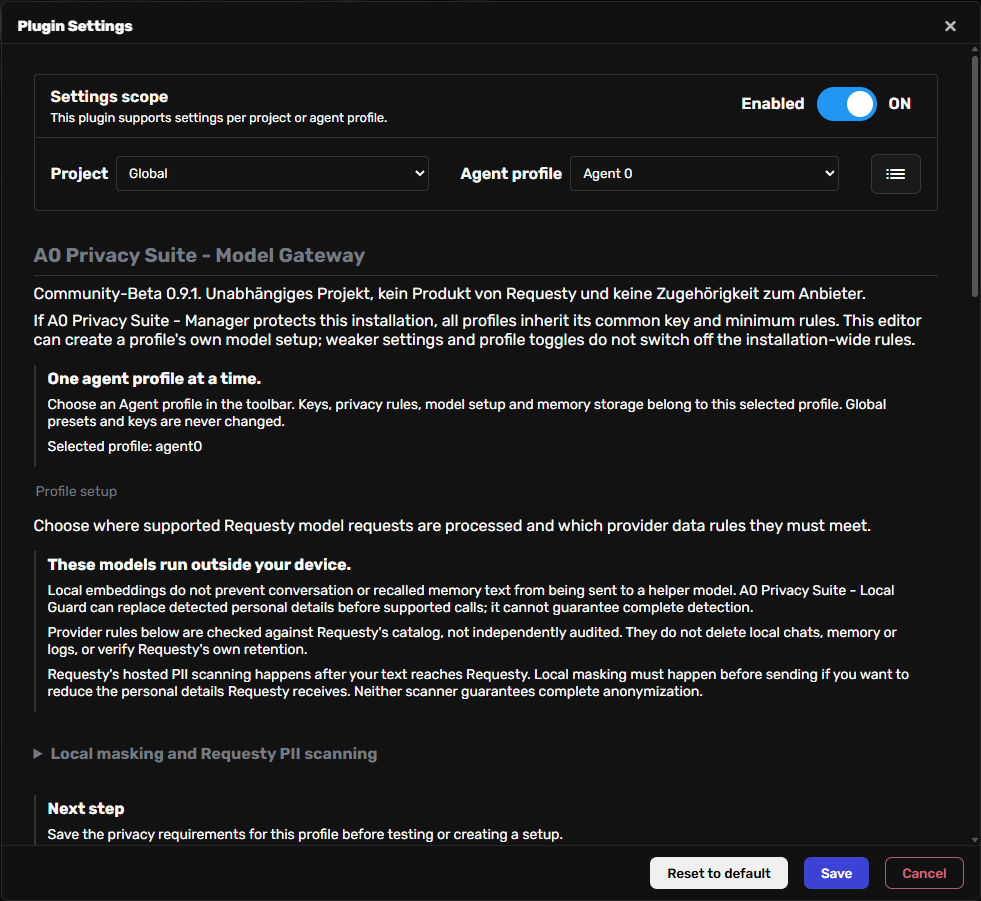
- In the native toolbar choose an Agent profile. A project can further separate the configuration. All-profiles and project-only saves are rejected. Settings and keys from another project or a legacy global installation are not inherited.
- Save a Requesty API key for this profile. It is stored under
usr/secrets/requesty/<project-profile-hash>/credentials.json, outside project repositories and scoped plugin ZIP data. The project/profile identity determines a separate directory; there is no fallback to another profile’s key. It is not added to Agent Zero's shared API Keys list. Files use the host filesystem permissions (atomic writes create mode 0600 on Linux); this is not an encrypted secret vault. - Choose region, model-region restriction, no provider retention and no provider training. Save privacy requirements keeps the dialog open.
- Load the authenticated catalog and select Conversation (Main) and Helper (Utility). Excluded models have reasons. Unknown metadata cannot satisfy a required restriction.
- Run the example test. It sends only a fixed synthetic prompt, at most two requests of 256 output tokens each. API costs may apply. The ticket is valid for ten minutes and bound to this profile, key, policy and model selection.
- Create the named profile setup, then explicitly Activate for this profile. Activation supplies Main and Utility defaults in chats of that profile/project combination. Native presets may choose other approved Requesty models or native local endpoints. A direct external provider or conflicting transport is rejected; correct the selection rather than weakening requirements. Activation does not create or activate a shared preset.
The initial policy is EU router, EU model processing, no provider retention and no provider training. Empty catalogs never relax requirements automatically. Changing profiles clears unsaved credentials, selections and test results, and late responses from the previous profile are ignored. A saved key is not a verified connection; a successful synthetic test is not a privacy audit.
Data and scope
The plugin pairs with A0 Privacy Suite - Local Guard, which replaces detected details in supported calls and applies local embedding settings to explicitly configured profiles. Detection can miss details and does not cover every external path.
Requesty routing and provider data rules are checked against authenticated catalog metadata, not independently audited. Model aliases and unsupported transport overrides are rejected. A required but unverifiable Requesty organization ZDR setting blocks all requests.
- Provider ZDR is checked using catalog retention/training metadata.
- Requesty's own organization retention is not verified or changed by this plugin.
- Local chats, logs and memory are not deleted by remote ZDR.
Local masking versus hosted PII scanning
Original names and contacts should remain readable in the local browser. Privacy checks must examine what is sent to external services. A0 Privacy Suite - Local Guard reduces disclosure by replacing detected values before supported calls; automatic detection does not guarantee complete anonymization.
Requesty's hosted Guardrails receive your request before masking it for the model provider. Fast and model-based ML scanners are available on standard and Enterprise plans. Report sends content unchanged; Mask replaces detected values and restores matching replacements in replies. This plugin does not configure or verify those organization/group Guardrails. Requesty documentation
Zero Data Retention concerns storage; it does not prevent transmission or necessary processing at Requesty. For the goal of keeping original details on the device, local masking is the first layer and hosted scanning can supplement it. Neither higher accuracy nor complete multilingual coverage has been established by our tests. Requesty privacy policy
See the integration test findings for actual outgoing-request checks, long conversations, reasoning, memory, restart and profile boundaries. The eight live Requesty model calls did not evaluate Requesty's PII scanner.
While active, a profile uses a separate memory folder identified by its project/profile combination. Existing shared memory is preserved and is not copied automatically. Automatic memory updates append entries without consolidating or replacing old entries. Saved native Memory settings are unchanged. Other profiles keep their own settings and indexes. If A0 Privacy Suite - Local Guard is also active, its profile/model-specific memory folder takes precedence. Embedding models remain under native configuration or A0 Privacy Suite - Local Guard.
Main and Utility wrappers guard unified calls and LangChain invoke/stream paths. Existing wrapper instances recheck their owning profile at request time and stop after deactivation. An alternate model remains usable only when current catalog metadata meets the active policy. Native tool Vision calls use a task-local owner; direct external sidecars are rejected. Catalog caches are separated by router and a hash of the profile key, and return copies. Both plugins must remain installed and enabled for their respective checks; this is not protection against deliberate plugin removal or arbitrary raw model clients.
Deactivation, removal and migration
Deactivate profile setup changes only the selected profile setup's active flag. It preserves credentials, setup and memory. Uninstall hooks no longer delete shared presets or rewrite references in other profiles. Global installation, dependency/provider registration, global toggle and removal of plugin code are Agent Zero administration operations for the entire instance. Use the profile toolbar toggle or profile setup deactivation for a profile-only change.
Agent Zero profiles share one process, filesystem and administrator. Profile ownership prevents accidental configuration and runtime crossover by these plugins; it is not a security sandbox against arbitrary tools, raw third-party model clients or administrators reading/editing files. Use separate instances for mutually untrusted agents.
Legacy global keys, presets, embedding backups and recovery files are preserved rather than automatically migrated or restored. Configure each intended profile explicitly. Legacy requesty_guarded presets have no owning setup and fail closed; replace that selection with a native preset or create a profile setup. Native ZIP removal/update may remove scoped override files as part of framework administration, so back up profile plugin data before uninstalling or replacing the plugin.
Validation
The regression suite uses Agent Zero's actual framework, temporary profile directories, synthetic keys and mocked catalog/model transports. It makes no live paid provider calls. It covers two-profile separation, setup/deactivation, expired or profile-crossing tickets, old wrapper objects, scoped Memory settings, native chat-gate status without returning credentials, streaming and failure behavior. A separate opt-in integration series subsequently made eight authorized live model calls; see the linked findings for its scope and limitations.
cd /a0
/opt/venv-a0/bin/python -m pytest usr/plugins/requesty/tests -q
See UI review, profile scope review and test strategy.
Current standard-protection validation
See the fixed-detector validation and historical 1.4 / 0.4 test results for native routes, multilingual sessions, secrets, inherited subordinate policy, images and the partly manual form test. Historical comparison reports describe earlier code. Installation/update hooks create owned native adapters for inherited policies, with ownership journals outside the plugin ZIP; restart Agent Zero after installation/update. Independent other-profile chats are unaffected. Local models remain native Agent Zero choices; no local-server metadata or weight checks are performed by these plugins. Full mappings contain local original values; malformed/truncated model tokens cannot reliably be restored, and truncated native chat titles use a neutral caption.
See the 12 October correction: effective Requesty model labels replace misleading shared-default labels in protected chats, without changing presets. Provider-specific local-server probes were removed.
See test environment and settings entry for the fixed Privacy Test profile, temporary isolation fixtures, and choosing an explicit profile before editing Requesty.
Kontoempfehlung und gemeinsamer Privacy Agent
Empfohlene Requesty-Kontoeinstellungen mit Screenshot: EU-Gateway, Requesty-ZDR, Anbieter-ZDR und geprüfte EU-Modelle. Die Kontocheckliste in Config ist eine datierte Nutzerbestätigung, keine technische Prüfung. Native Preset-Menüs erhalten Zulässigkeit und konkrete Ablehnungsgründe; aktuelle Modellidentitäten einschließlich Vision bleiben sichtbar.
A0 Privacy Suite - Manager ist ein separates Komfort-Plugin für die gesamte Installation. Es setzt Mindestregeln und gemeinsame Modelle/Schlüssel durch, ohne gespeicherte Profile oder gemeinsame Presets umzuschreiben. Eigene aktive Profilsetups bleiben möglich; strengere Profilanforderungen gelten auch bei geerbten Modellen. Dieses Plugin bleibt allein weiterhin profilbezogen nutzbar.
Kurze Modellnamen und Routing-Policies
Die Auswahl zeigt zunächst kurze Requesty Managed Policies, sofern passende vorhanden sind. Anbieterspezifische IDs bleiben über den Schalter verfügbar; gespeicherte spezifische Auswahlen bleiben sichtbar. Namen werden unverändert gesendet, niemals durch Abschneiden eines Anbieterpräfixes erzeugt.
Der authentifizierte /v1/models-Katalog muss zuerst erfolgreich geladen werden. Der ergänzende öffentliche /v1/models/managed-Katalog enthält die dokumentierten aggregierten Datenschutz- und Fähigkeitsangaben der Managed Policies; diese werden gegen dieselben Mindestregeln geprüft. Er ist nicht auf den API-Schlüssel begrenzt: Requesty kann einen angezeigten Namen zusätzlich durch Schlüssel-/Kontoregeln ablehnen. Bei eigenen namensgleichen Policies werden öffentliche Angaben nicht als Nachweis verwendet. Eigene policy/<name>-Ziele sind derzeit nicht unabhängig prüfbar und bleiben gesperrt. Fehlende oder globale Standortangaben reichen nicht für EU-Schutz.
Managed Policies, Managed-Katalog. Requesty kann Managed Policies ändern; die Prüfung verwendet aktuelle Katalogangaben mit höchstens 60 Sekunden Cache. Sie bestätigt Anbieterangaben, keine unabhängig auditierte Ausführung.
Privacy-Auswahl im Chat und Profil-Editor
Das Chat-Menü zeigt die geprüfte gespeicherte Einrichtung als eigene Auswahl: „A0 Privacy · gemeinsam“ bei gemeinsamer Basis, sonst „A0 Privacy · Profileinrichtung“. Sie kehrt über die native Funktion zur scoped configuration zurück, statt ein künstliches globales Preset zu speichern. Alte globale Presets bleiben erhalten und werden separat geprüft. Die ausgewählte Privacy-Basis ist als aktiv erkennbar; unzulässige Chat-Presets bleiben gesperrt. Globale Modelleinstellungen und Profil-Editor erklären die effektive Privacy-Route.
Der native Profil-Editor verwendet Lesekontexte ohne Chat-ID. Diese erhalten ihre eigene Profilkonfiguration, ohne Parent-Chat-Suche, Rücksetzen von Chat-Auswahlen oder Zugriff auf fremde Chat-Zuordnungen. Native Regressionen decken Editoröffnung sowie eine geprüfte gemeinsame Menüauswahl ohne Schlüsselwerte im API-Ergebnis ab.
Native Requesty-Presets (Privacy Agent 0.2)
Der aktivierte Manager kann nach ausdrücklicher Migrationsvorschau A0s Default, Efficiency und Power auf geprüfte Requesty-EU-Modelle umstellen. Native Presets sind anschließend die einzige Quelle für Main, Utility und Vision; die Privacy-Policy und Schlüssel bleiben getrennt. Zulässige Modelländerungen im normalen A0-Preset-Editor erfordern keine Abschaltung. Der Provider ist Requesty, Embeddings bleiben auf dem eingerichteten lokalen Modell. Kurze Managed-Namen und mit einer Anbieterpräfix-Suche spezifische IDs bleiben möglich.
Neue Einrichtungen starten mit Default (Sol/Luna); Efficiency verwendet GLM/DeepSeek mit separatem DeepSeek-Vision-Modell, Power Opus/Luna. Diese Vorbelegung startet keine kostenpflichtigen Modelltests. Jede Migration validiert den aktuellen Katalog und verlangt Ersatz für fehlende Standardmodelle. Eine bereits ausdrücklich gewählte gemeinsame Einrichtung kann als eigenes natives Preset erhalten und ausgewählt bleiben. Vorhandene aktive Profilsetups werden als native Profil-Presets übertragen; Schlüssel werden nicht in Presets kopiert. Andere individuelle Presets bleiben erhalten, unzulässige davon gesperrt.
Sicherungen liegen ausschließlich lokal unter usr/privacy-agent/preset-backups. Veraltete Vorschauen werden abgelehnt. Eine fehlgeschlagene Übernahme stellt die vorherigen Presets und Zuordnungen wieder her. Die separate Wiederherstellung ist nach zentraler Deaktivierung möglich und verweigert das Überschreiben späterer Änderungen. Updates migrieren oder überschreiben Presets nicht automatisch. Erst nach Vorbereitung der Komponenten, bestätigter Migration und expliziter Aktivierung gelten die installationsweiten Regeln.
Die nativen Speicher- und Auswahladapter werden beim A0-Start eingerichtet, sind reversibel und verändern keine A0-Kerndateien. Direkte API-Eingaben werden ebenfalls geprüft; alte Modellwrapper mit abweichender Modellwahl müssen neu aufgebaut werden. Ohne Manager bleibt das eigenständige Verhalten dieses Plugins erhalten. Bildinhalte und beliebige Werkzeugübertragungen bleiben außerhalb der lokalen Textmaskierung.
Source code and local privacy filtering
The Model Gateway is part of A0 Privacy Suite 0.9.3; its routing and provider-policy checks are unchanged. Source-code recognition belongs to the separate A0 Privacy Suite - Local Guard component, included in suite version 0.9.3. Recognized Python and conservative JavaScript/TypeScript syntax is retained while comments, string data and secrets remain checked. Unsupported source uses ordinary text checks. This does not provide blanket code exclusion or change Requesty routes. See code handling and limits.
The historical integration reports retain their original test scope. The fixed-detector lifecycle report describes the previous 1.7.4/0.2.7 release; new source-code regressions are recorded with the A0 Privacy Suite - Local Guard change.
For primarily local installations without external access, Manager 0.3.1 makes the interface login optional but strongly recommends it. Anyone who can access an unauthenticated interface can manage profile exceptions. A configured login still requires an authenticated session; explicit full-context consent and native CSRF remain required.
Suite versioning and existing installations
All three components use the same suite version. 0.9.3 starts the unified community beta numbering and replaces the former Local Guard 1.9.0, Model Gateway 0.6.1 and Manager 0.3.3; it does not remove their functionality. Patch versions (0.9.x) cover fixes, later 0.x minor versions cover feature or compatibility changes, and 1.0 is reserved for a separately decided stable release. Versions below 1.0 do not promise a stable public API. Update all three components together through the native Git plugin updater and restart Agent Zero; older Local Guard metadata has a higher number, so an installer that refuses downgrades may require the explicit Git update. Do not uninstall or delete user data to change the name. Existing internal IDs, repository URLs, keys, mappings and stored presets remain valid. Historical tags and reports remain unchanged; new packages are marked as pre-releases.
Community beta 0.9.3: compatibility and installation
Test target: Agent Zero 2.13 on Linux Docker, framework Python 3.12, CPU-only privacy detection. The exact image/framework commit and observed cold-install/download measurements are recorded in docs/COMMUNITY-BETA-VALIDATION.md. Other versions and deployment types have not been certified. This is independent community software, not an official Requesty product.
Install all three components on the same version through the native Plugin Hub, Git or the published ZIPs. Start with the Manager; its configuration provides an explicit button to install missing pinned companion packages. Installation does not activate central policy and does not invoke a paid model. Configure the Requesty key/routing and local languages deliberately before activating. Restart A0 after all component updates. An active policy must be deactivated centrally before using ordinary plugin-disable or uninstall actions; profile toggles cannot override it.
Local Guard downloads missing English/German spaCy models during installation. Additional languages require their corresponding model downloads. The configured local embedding model (sentence-transformers/paraphrase-multilingual-MiniLM-L12-v2) may download on first use; model files need disk space and network access during setup, then inference is local. Ollama is optional and is not used by the PII detector. CPU time and memory depend on language models, text length and parallel chats; reserve additional host RAM/disk capacity and consult the measured beta report rather than treating development measurements as universal minimums. Missing required NER models block supported external calls.
See security reporting and deployment limits. Current beta screenshots and test scope are linked in the validation report. No claim of complete anonymization or unrestricted protection of images/tools is made.
Activation state and recovery (0.9.3)
The ordinary plugin toggle does not override an active central policy. The Manager shows plugin enablement, central activation and integrity of its own native adapters separately. A boolean active: false in the state file represents deliberate central deactivation. A new installation with no activation history is unconfigured. Invalid/missing activation fields, unreadable JSON, unsafe paths, or a missing active.json where an activation record or Manager ownership journal remains are errors: supported enforcement paths block rather than interpreting this as intentional disablement. An activation receipt contains only schema/managed status, no keys, PII or mappings.
Restore damaged usr/privacy-agent/active.json (and a damaged activation record, if present) from a trusted backup with its original state; do not replace it with an empty object, string or guessed false to clear an error. No automatic activation/deactivation is performed by repair. Keep model requests paused during maintenance; then restart A0 and check central status before use. The plugin is not an access-control boundary against an administrator who deliberately deletes all state and enforcement files.
For intact activation state, use Eigene Prüfhaken wiederherstellen to restore missing known Manager adapters; conflicting modified files require manual review and are not overwritten. After explicit central deactivation, Inaktive Prüfhaken bereinigen removes only hash-matching owned files and preserves modified/foreign files and their ownership evidence. This maintenance and normal Manager uninstall do not require either companion plugin to be available. Keys, presets, profiles and mappings are retained. Restoring hooks does not reinstall companion plugins or models; complete those separately through the native installer.