
Shortcuts
Scope-aware slash shortcuts for composing reusable prompts with optional arguments and multi-shortcut expansion in the Agent Zero chat box.
Screenshots
README
Shortcuts
Project-aware slash shortcuts for the Agent Zero chat composer.
What it does
Shortcuts is a prompt-composition plugin for the chat box.
It supports:
- reusable slash shortcuts
- multiple shortcuts in one user message
- global and project shortcut allocation
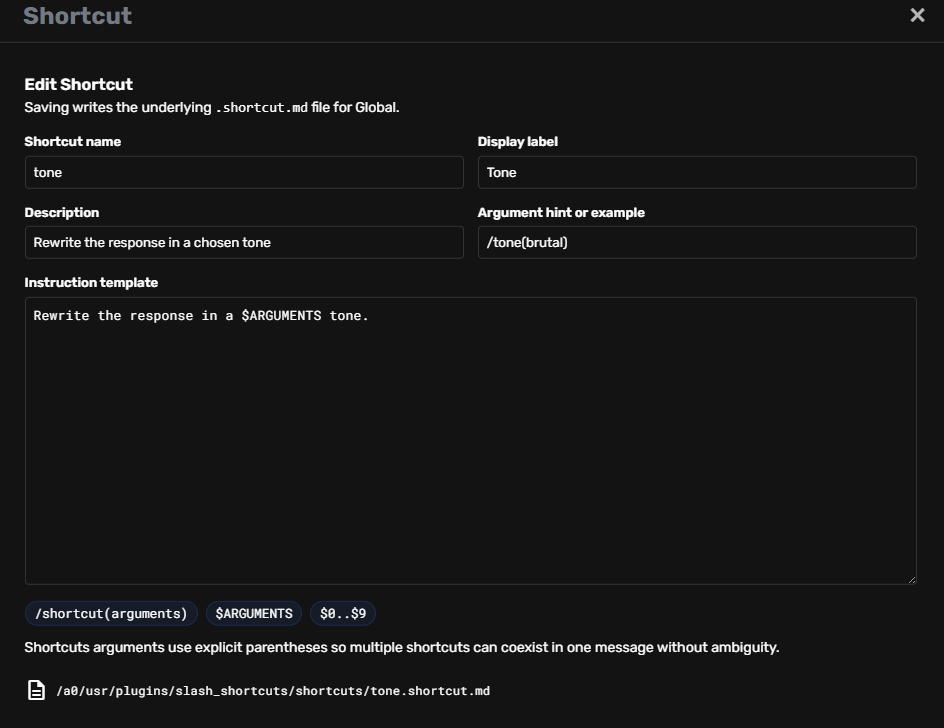
- explicit argument support
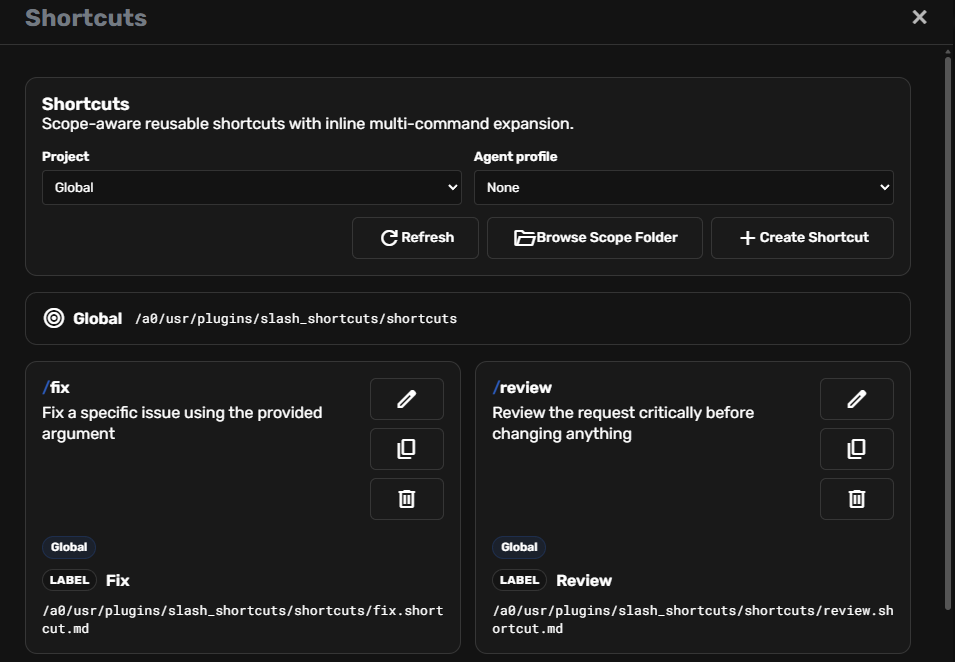
- a dedicated sidebar manager
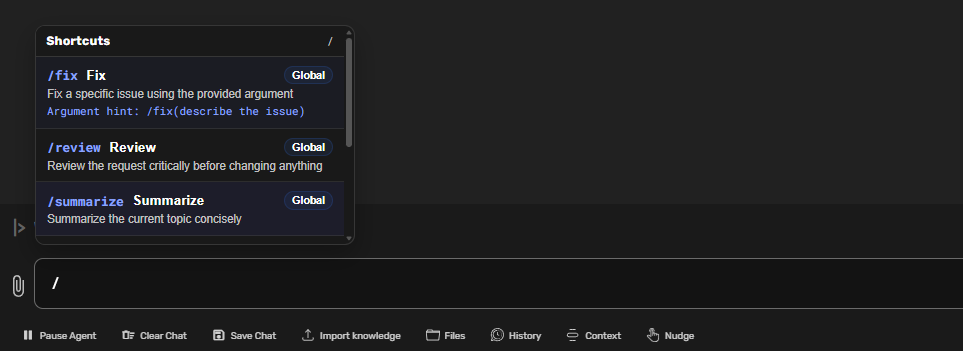
- a popup suggestion menu in the composer
Unlike simpler slash command systems, Shortcuts is designed so multiple accepted shortcuts can participate in one message.
Important upgrade notice for older users
I owe existing users a direct apology here: older versions of Shortcuts stored editable shortcut files inside the plugin install folder. That was the wrong design for user-owned data and it could block updates for people with lots of shortcuts.
If you are upgrading from an older version and the Plugin Installer fails, your shortcuts do not need to be lost. Back them up first, then reinstall, then restore them using this guide:
Once you are on the new layout, shipped examples live in /helpers/examples/ and editable global shortcuts stay in /shortcuts/.
Legacy backup and reinstall
This plugin previously had a separate backup/reinstall note because older versions stored editable shortcut files inside the plugin install folder. That layout was wrong for mutable user data.
- Back up legacy shortcuts before reinstalling.
- Restore them into the correct scoped
shortcuts/directory after reinstall. - Shipped examples now live under
helpers/examples/.
Core syntax
Shortcuts arguments use this syntax:
/command(arguments here)
Not:
/command arguments here
This is deliberate. The plugin supports multiple shortcuts in one message, so explicit parentheses avoid parsing ambiguity.
Argument support
Shortcut instruction templates can use:
$ARGUMENTS— full argument string$0..$9— positional tokens
Example using $ARGUMENTS
Shortcut instruction:
Rewrite this in a $ARGUMENTS tone.
Usage:
/tone(brutal)
Expansion:
Rewrite this in a brutal tone.
Example using $0..$9
Shortcut instruction:
Summarize this in $0 bullets for a $1 audience.
Usage:
/summarize(5 technical)
Expansion:
Summarize this in 5 bullets for a technical audience.
Scope model
Shortcuts can exist in these scopes:
- Global
- Project
Use:
- Global for generally useful shortcuts
- Project for project-specific workflows
Management UX
Shortcuts are managed from a dedicated sidebar button.
The plugin provides:
- sidebar button for opening the manager
- manager modal for CRUD operations
- scope selector for project
- popup suggestions in the composer
- popup scope badges
- popup argument hints
- popup footer action to add a new shortcut
Popup behavior
When typing in the composer:
/opens the shortcut popup- typing filters the popup
- Tab can accept the highlighted shortcut
- accepted normal shortcuts autofill with a trailing space
- accepted argument-capable shortcuts autofill as
/command()with the caret inside - Space should behave like normal typing, not forced acceptance
The popup also includes:
- scope indication
- argument hint display
- an Add shortcut action at the bottom
The popup Add shortcut action opens the Create Shortcut flow in Global scope.
If the plugin feels empty on first install, copy a starter file from /a0/usr/plugins/slash_shortcuts/helpers/examples/ into the active shortcuts/ scope, or create a new shortcut directly from the manager.
Settings
Open:
- Settings → Plugins → Shortcuts → agent
Behavior settings include:
- enabled
- show descriptions
- keep popup open after insert
- compact mode
- description matching
- popup width
- popup height
- popup upward offset
- popup horizontal offset
Storage model
Shortcuts are stored as markdown-backed files with frontmatter.
Location pattern:
- runtime shortcuts load from scoped
shortcuts/directories under the plugin resolution path - shipped examples live in
/a0/usr/plugins/slash_shortcuts/helpers/examples/
File suffix:
.shortcut.md
Supported frontmatter keys:
namedescriptiondisplay_labelargument_hint
The markdown body is the instruction template.
Included examples
The repo ships example shortcuts in /a0/usr/plugins/slash_shortcuts/helpers/examples/ such as:
summarizefixreviewtonetranslate
The global shortcuts/ scope is intentionally empty-by-default for real user edits.
Related skill
A companion skill exists for creating better shortcuts:
/a0/usr/skills/shortcuts-create-command/SKILL.md
It helps with:
- choosing scope correctly
- using
$ARGUMENTSeffectively - using
$0..$9intentionally - designing reusable shortcut templates
Notes
- Shortcuts is built for prompt composition, not random canned text.
- Explicit shortcut acceptance matters.
- Parenthesized argument syntax is the intended format.
- The plugin is strongest when used for reusable global and project prompt operators.