
Thread+
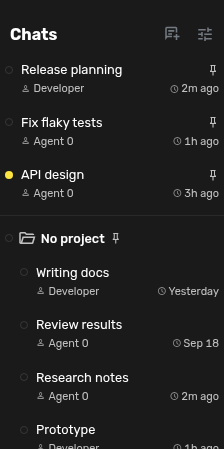
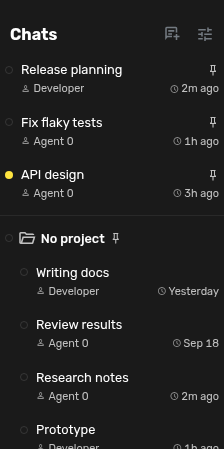
Show configurable last activity, new activity, running state, project, agent profile, and creation date beneath chat titles in the Agent Zero sidebar.
Screenshots
README
Thread+
Thread+ adds a compact second line beneath chat titles in Agent Zero's sidebar. It works with the flat chat list, Sidebar Folders, and nested chats. The plugin uses existing chat snapshot fields and does not fetch chat histories or call an external service.
Install and configure
Enable Thread+, reload the WebUI, then open its Settings page. Choose which fields to show and save.
Save persists these preferences globally in the plugin's config.json, including across page reloads. Cancel discards unsaved changes.
Available fields: last activity, new activity, paused state, project, agent profile, and creation date. Last activity can be relative or a calendar date. Last activity, new activity, and paused state appear by default. An unread marker sits directly after the chat name: a tiny solid centre in the main CSS highlight colour, surrounded by a soft translucent halo. A pause icon means paused. Working uses Agent Zero's native spinning chat dot, without a duplicate label or spinner from Thread+. The pause icon is slightly larger than ordinary metadata, with no background, border, or animation. Hover anywhere on the detail line for one tooltip with state, indicator meanings, names, and timestamps; indicators must not own nested tooltips. Names and dates stay readable, the unread marker has its own accessible description, and the detail line has an accessible label with the full information. The activity baseline is stored in this browser's localStorage, so it is not synchronized across devices or browsers.
Context and status appear on the left of the detail line; last activity stays on the right. The tooltip shows the full activity timestamp without repeating the relative label, plus creation time and selected details. If the sidebar is narrow, the left detail text truncates rather than pushing the time or action buttons off screen. Disabling or removing the plugin restores the original one-line rows after a page reload. There are no dependencies, setup hooks, external accounts, or uninstall side effects.
Activity and Working state come from Agent Zero's context snapshots. If core supplies a stale timestamp or reports an executing subagent as idle, Thread+ displays those values; this plugin does not infer execution state or repair saved chat timestamps.
Why these fields
Research found repeated demand for recency, project context, and visible active or unread state. An Open WebUI issue specifically distinguishes last activity from creation time. Slack's unread view uses concise previews and unread cues; Slack's design account describes testing thread navigation. Thread+ includes only fields already available in Agent Zero's sidebar snapshot, keeping the list fast and the plugin self-contained. Conversation summaries, model usage, and token costs need additional data sources, so this version does not claim to show them.
Check
Run node tests/test_frontend.mjs from this repository root. Checks cover time formatting, new activity, icon rendering, loading saved visibility preferences, context updates, and tooltip timestamps. The source is a standalone Agent Zero plugin: plugin.yaml, README.md, and LICENSE live at the repository root.