
File Finder
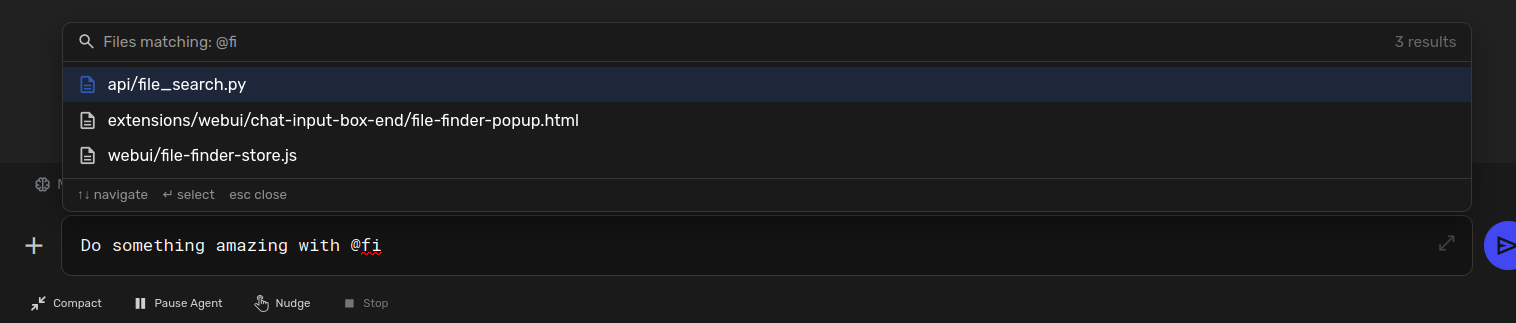
A fuzzy file finder popup, triggered by typing @ in the chat input
Screenshots
README
File Finder
A fuzzy file finder popup for Agent Zero, triggered by typing @ in the chat input.
Screenshot
Features
- @ Trigger: Type
@in the chat input to open the file finder popup - Fuzzy Search: Type to filter files with fuzzy matching (matches characters in sequence)
- Keyboard Navigation: Arrow keys to navigate, Enter/Tab to select, Escape to close
- Click Selection: Click any file in the list to select it
- Project Aware: Automatically lists files from the current project directory
- Smart Scoring: Ranks results by match quality (consecutive chars, word boundaries, filename matches)
Installation
Place the plugin in /a0/usr/plugins/file_finder/ and ensure it is enabled.
Usage
- Open a chat in a project context
- Type
@in the chat input - A popup appears listing all project files
- Type to fuzzy-filter the list (e.g.,
@storematcheswebui/my-store.js) - Use arrow keys or mouse to select a file
- Press Enter or Tab to insert the file path
- The selected path is inserted as
@relative/path/to/filein your message
File Structure
file_finder/
├── plugin.yaml           # Plugin manifest
├── api/
│   └── file_search.py    # Backend API for recursive file listing
├── webui/
│   └── file-finder-store.js  # Alpine store (popup state, fuzzy matching, keyboard nav)
├── extensions/
│   └── webui/
│       └── chat-input-box-end/
│           └── file-finder-popup.html  # Popup UI overlay
└── README.md
API Endpoint
POST /api/plugins/file_finder/file_search
Request body:
{
  "ctxid": "<context_id>",
  "query": "optional search string"
}
Response:
{
  "ok": true,
  "base_path": "/a0/usr/projects/my_project",
  "files": [
    { "path": "src/main.py", "name": "main.py", "is_dir": false },
    { "path": "src/utils", "name": "utils", "is_dir": true }
  ]
}
Configuration
No configuration required. The plugin works out of the box.
Ignored Directories
The file scanner skips common non-essential directories:
.git, node_modules, __pycache__, venv, .venv, dist, build, .idea, .vscode, .a0proj, and more.
Limits
- Maximum 500 files returned per scan
- Maximum directory depth: 8 levels
- Maximum 50 results shown in the popup